

Creation
Select Create Jail from the Jails page to open the creation wizard. Sylve creates a dedicated ZFS dataset, copies the selected root filesystem into it, writes the jail configuration, and prepares the initial network and runtime files in one operation.
Before starting, make sure the destination node has:
- A usable ZFS pool for the jail root.
- A completed jail bootstrap or an extracted Base/RootFS download.
- A Standard or Manual switch if the jail will use its own network stack.
- Available network objects if you prefer managed addresses instead of entering raw values.
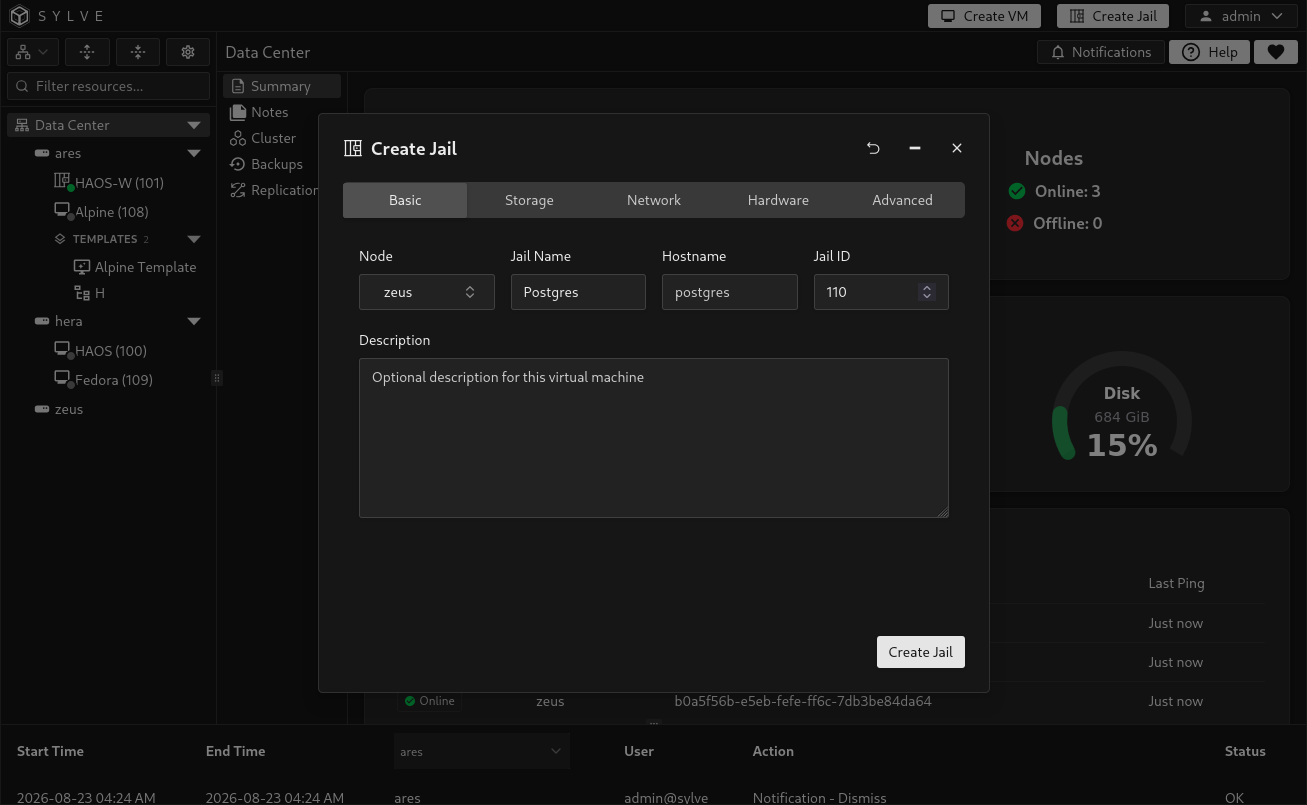
Give the jail an identity that is unique and easy to recognize.
| Field | Purpose |
|---|---|
| Node | The node that will own the jail. This appears when creating from a cluster view. Changing the node clears node-specific selections such as the pool, base, switch, and MAC address. |
| Jail Name | A human-readable, valid guest name. |
| Hostname | The hostname configured inside the jail. It is optional, but strongly recommended for service discovery, logs, and shell prompts. |
| Jail ID | A numeric guest identifier from 1 to 9999. Sylve suggests the next available value and verifies that it does not conflict with a jail or VM anywhere in the cluster. This value is also called the CTID. |
| Description | Optional operational context, limited to 1024 characters. |
Storage
Section titled “Storage”Every jail needs a ZFS pool and one root filesystem source. Sylve creates the jail root at:
<pool>/sylve/jails/<Jail ID>The selected pool must be usable, and the destination dataset must not already exist. If the Pool list is empty, create or import a ZFS pool on the selected node first.
Choose a root filesystem
Section titled “Choose a root filesystem”The Base selector presents two supported sources:
| Source | Use it when | Requirements |
|---|---|---|
| Bootstrap | You want Sylve to prepare a supported FreeBSD pkgbase root directly on the selected pool. | The bootstrap must finish successfully before it can be selected. Its FreeBSD version must be compatible with the host. |
| Base/RootFS download | You already have an extracted FreeBSD base or Linux root filesystem in Downloader. | The download must be marked Base/RootFS, have extraction enabled, and have status Done. The resulting path must be a directory. |
Select the download-box action beside Base to open Bootstrap Jail Bases. Choose a supported release and start the bootstrap. Sylve creates a managed dataset, configures the FreeBSD package repositories, and installs the required pkgbase content. Wait until its status is Installed, then select it as the jail base.
Select a pool and base
Section titled “Select a pool and base”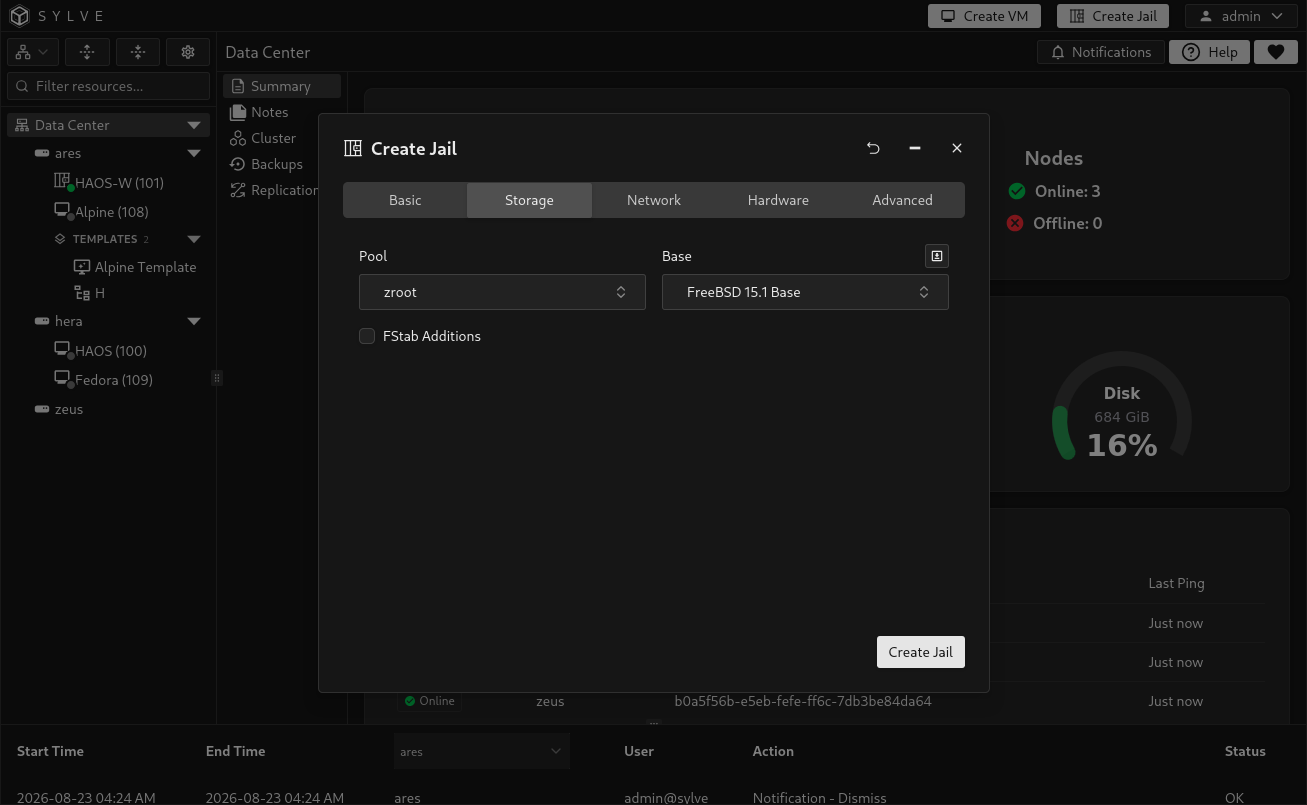
Bootstrap a FreeBSD base
Section titled “Bootstrap a FreeBSD base”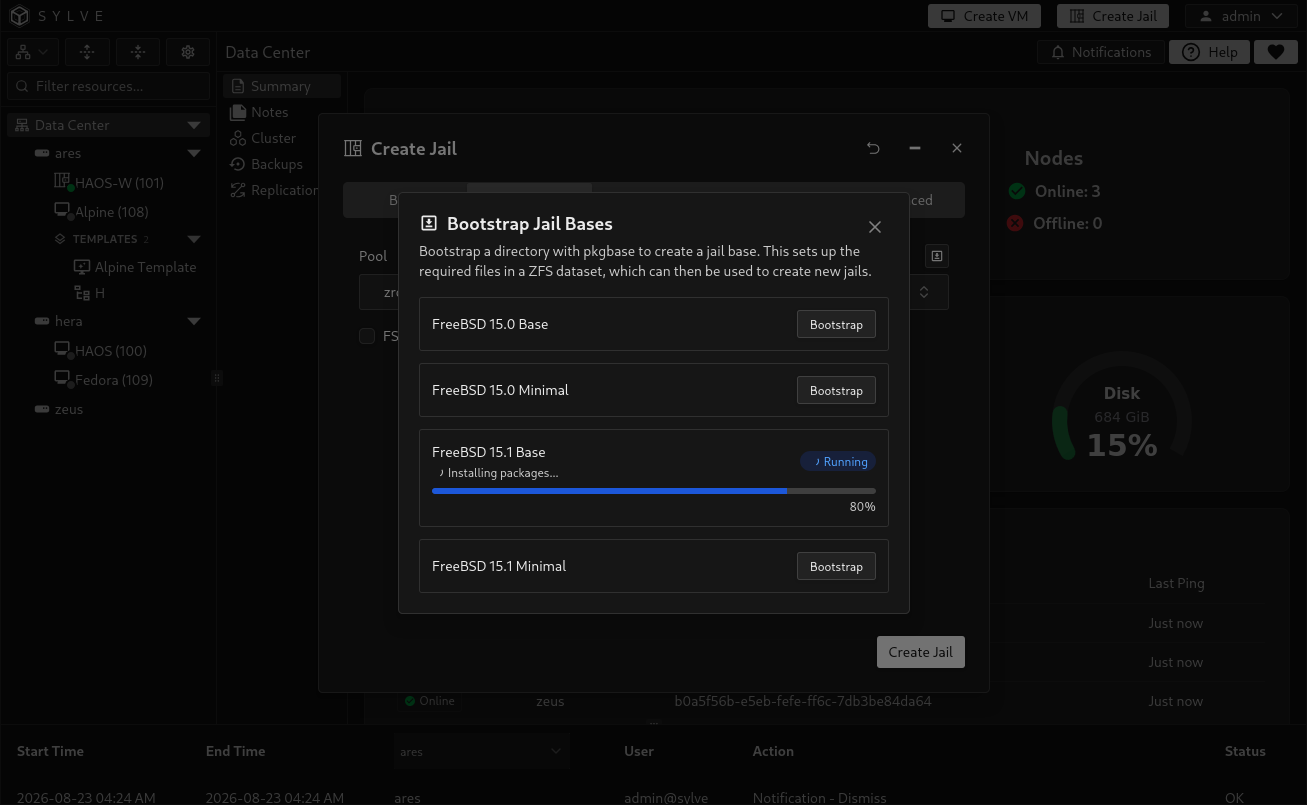
To use a downloaded archive instead, add it through Downloader. For example, a FreeBSD base.txz must be categorized as Base/RootFS and extracted by Downloader. Merely downloading the archive is insufficient because jail creation copies directory contents rather than extracting an archive itself.
Add filesystem mounts
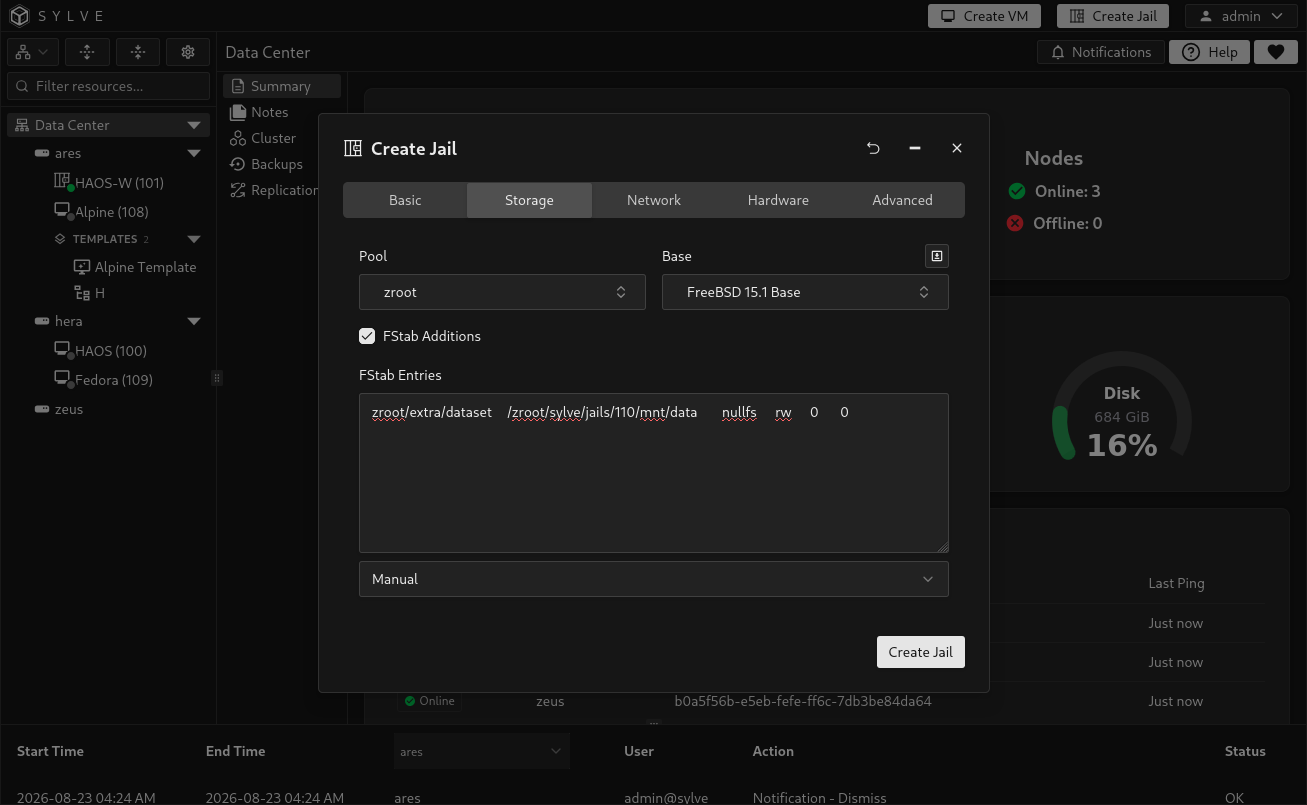
Section titled “Add filesystem mounts”Enable FStab Additions to write extra entries to the jail’s managed fstab. These mounts are applied when the jail starts.
The editor supports:
- Manual, for complete fstab entries you provide yourself.
- Simple Linux, which generates common
devfs,tmpfs,fdescfs,linprocfs, andlinsysfsmounts below the resolved jail root.
The Simple Linux preset is available only when Sylve can resolve the selected pool’s managed jails mountpoint. Review generated entries before creation, especially after changing the pool or Jail ID.
Network
Section titled “Network”Choose one initial networking mode. Additional interfaces can be managed after creation.
| Mode | Behavior | Typical use |
|---|---|---|
| Standard Switch | Creates a VNET interface on a Sylve-managed bridge. | Normal isolated jail networking managed by Sylve. |
| Manual Switch | Creates a VNET interface on a bridge you manage. | Existing or specialized host networking. |
| Inherit | Shares selected parts of the host network stack instead of creating a VNET interface. | Simple services that do not require an isolated network stack. |
| None | Creates the jail without an initial network interface. | Offline preparation or networking that will be added later. |
Use a Standard or Manual switch
Section titled “Use a Standard or Manual switch”After selecting a switch, configure the initial interface:
| Field | Purpose |
|---|---|
| IPv4 Network | A managed Network object or a raw IPv4 address with CIDR, such as 10.254.100.44/24. Leave empty when using DHCP. |
| IPv4 Gateway | A managed Host object or a raw IPv4 address. Leave empty when using DHCP or when no IPv4 default route is required. |
| IPv6 Network | A managed Network object or a raw IPv6 address with CIDR. Leave empty when using SLAAC. |
| IPv6 Gateway | A managed Host object or a raw IPv6 address. Leave empty when using SLAAC or when no IPv6 default route is required. |
| MAC Address | An unused managed MAC object or a valid raw MAC address. If omitted, Sylve generates a unique managed MAC object. |
| VLAN | Optional VLAN identifier from 0 through 4095. Use 0 when no VLAN tag is required. |
| DHCP | Requests automatic IPv4 configuration and disables the manual IPv4 fields. FreeBSD jails only. |
| SLAAC | Requests automatic IPv6 configuration and disables the manual IPv6 fields. FreeBSD jails only. |
The initial interface is treated as the jail’s default-gateway interface. Managed MAC, IPv4, and IPv6 objects must be unused. Gateway objects may be shared. The generate action beside each selector can create the appropriate Network, Host, or MAC object without closing the wizard.
If no switches appear, create a Standard Switch or Manual Switch first. Existing objects can be managed under Network Objects.
Configure the initial interface
Section titled “Configure the initial interface”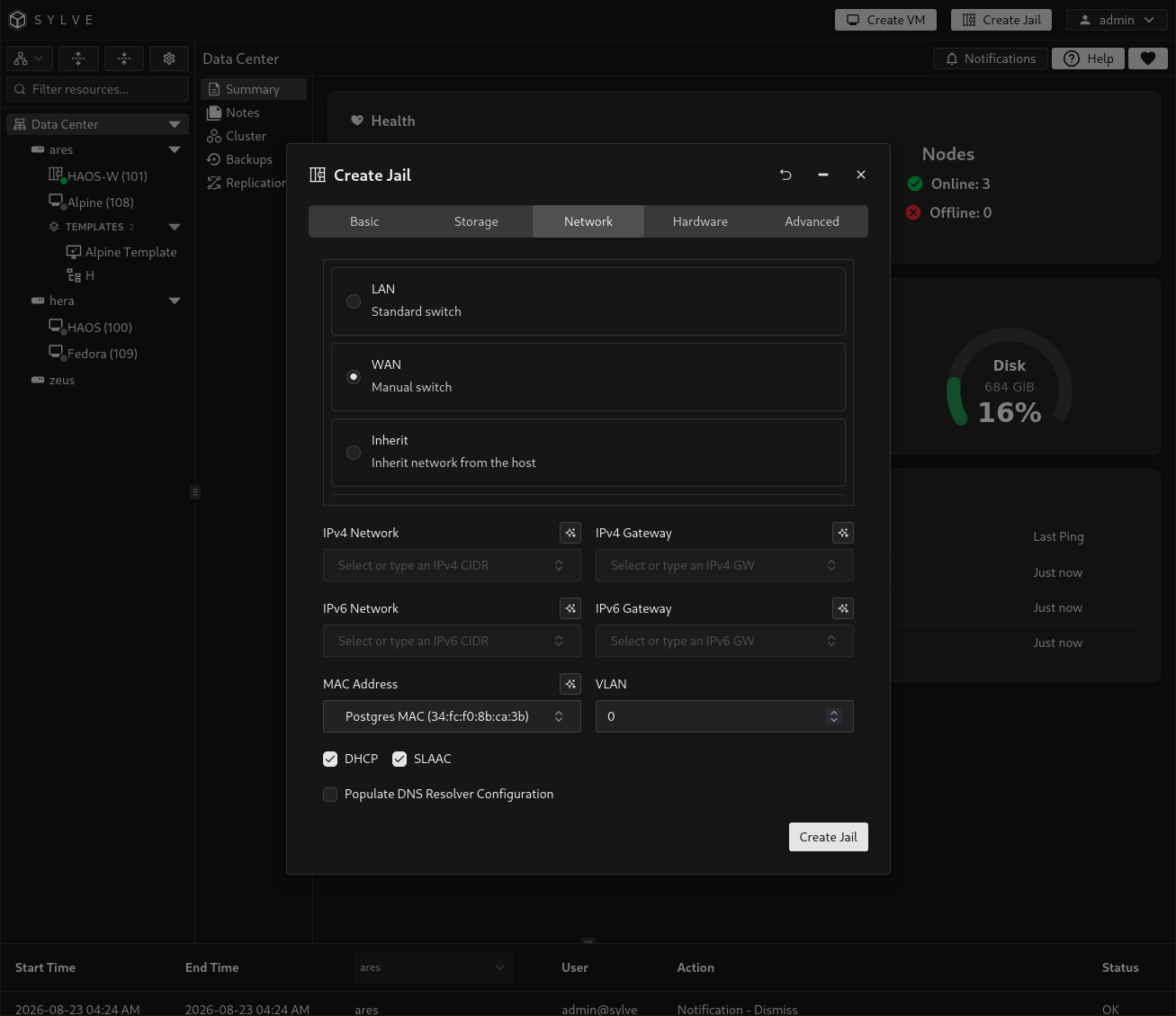
Create a network object inline
Section titled “Create a network object inline”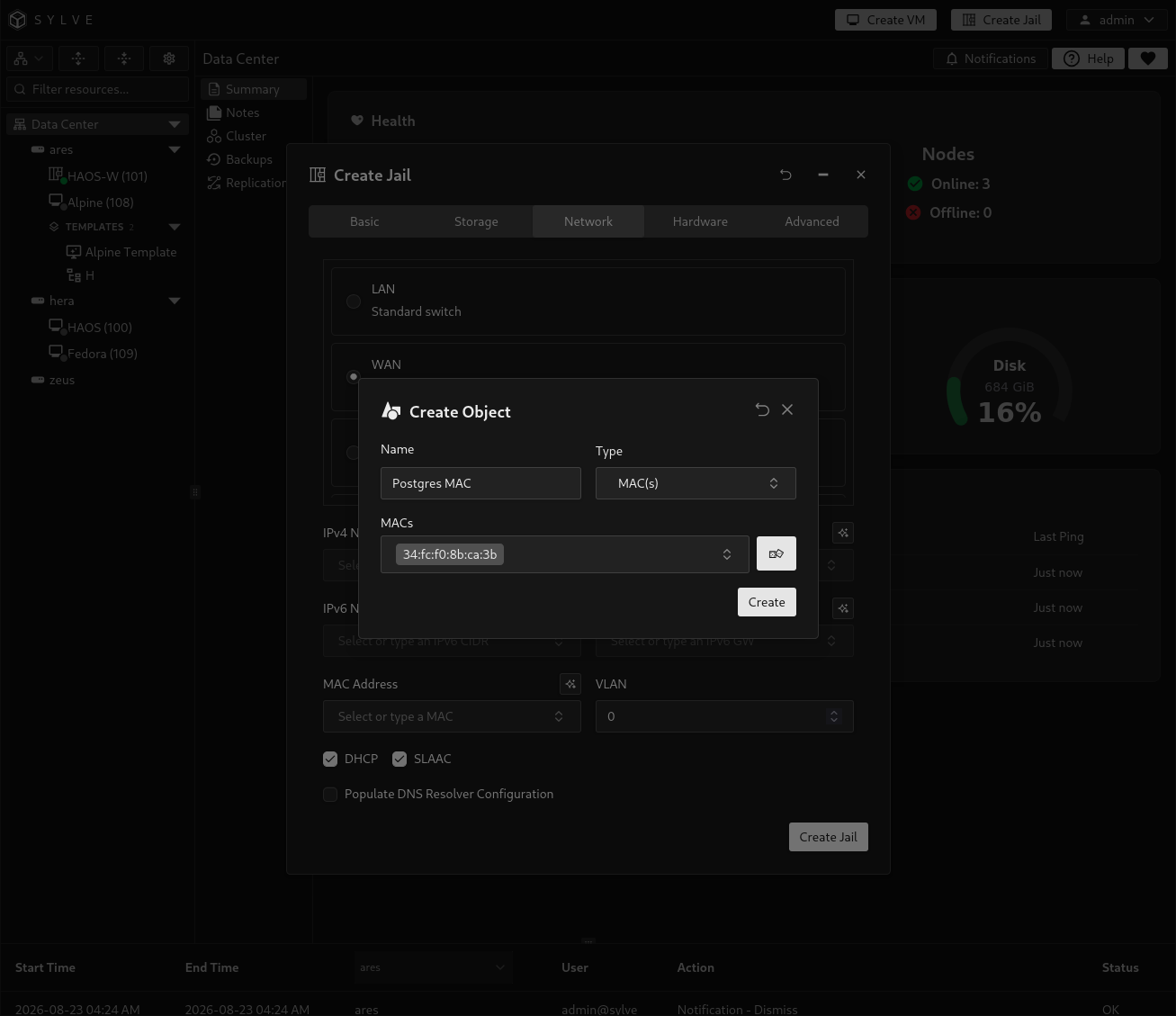
Inherit the host network
Section titled “Inherit the host network”Select Inherit, then enable IPv4, IPv6, or both. At least one address family must be inherited. No VNET interface, switch attachment, or managed MAC object is created in this mode.
Inherited networking is convenient, but the jail shares the host’s network stack for the selected families. Use a switch when the workload needs its own addresses, routes, interfaces, or stronger network separation.
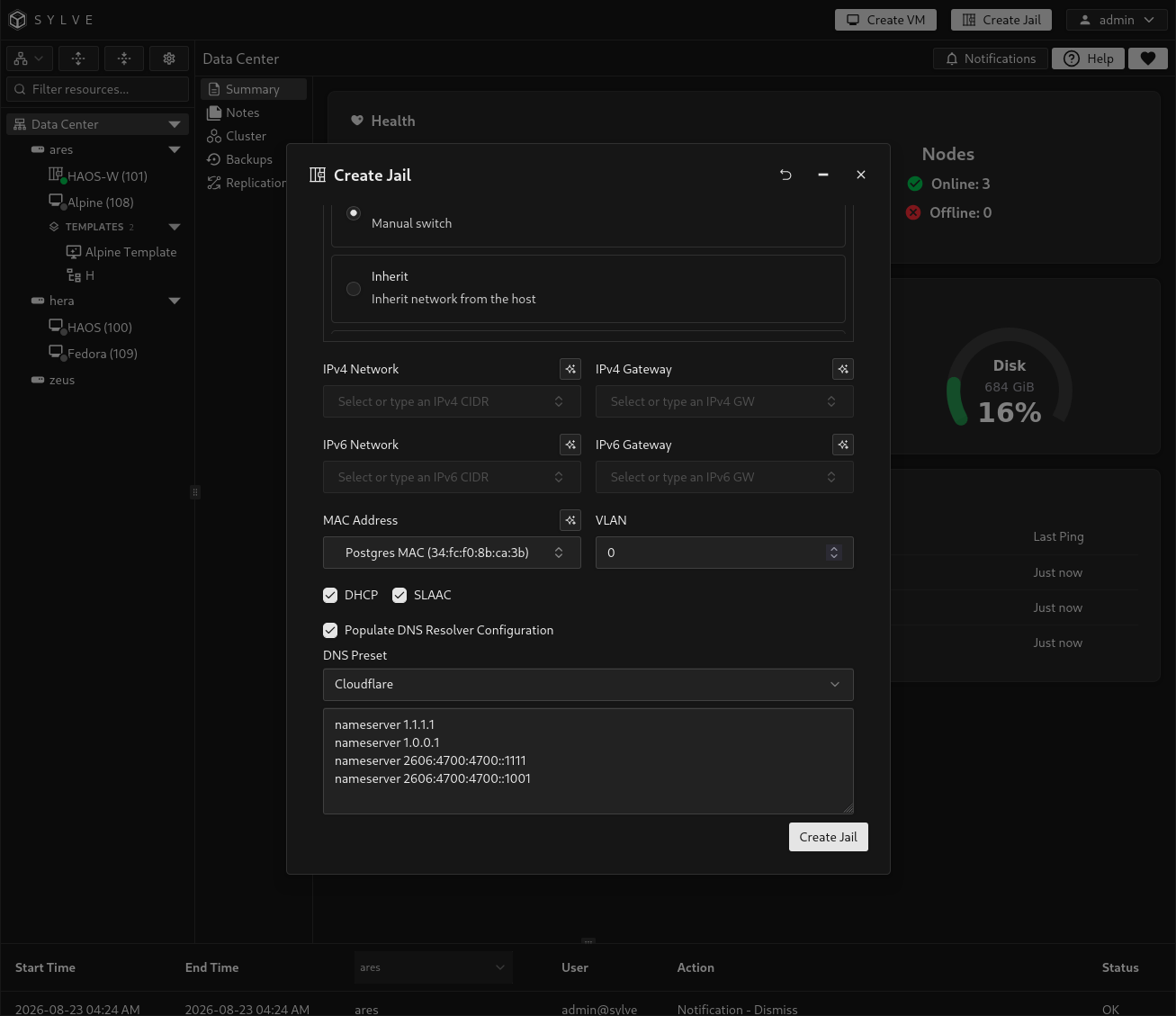
Populate DNS configuration
Section titled “Populate DNS configuration”Enable Populate DNS Resolver Configuration to write /etc/resolv.conf inside the new jail. Choose Cloudflare, Google, or Quad9 to populate a preset, or choose Manual and provide your own nameserver and search lines.
This setting is independent of the selected networking mode. It writes resolver configuration, but it does not guarantee that the selected DNS servers are reachable.
Hardware
Section titled “Hardware”Jails share the host kernel, so these controls apply resource limits rather than emulating hardware.
| Setting | Purpose |
|---|---|
| CPU Cores | Number of host logical CPUs assigned to the jail’s cpuset when resource limits are enabled. Sylve selects an available CPU set. |
| Memory Size | Maximum memory available to the jail when resource limits are enabled. Human-readable binary sizes such as 1GiB are accepted. |
| Boot Order | Non-negative ordering value used when automatically starting managed jails. Lower values start earlier. |
| Start On Boot | Starts the jail automatically when its node starts. |
| Resource Limits | Enables CPU and memory enforcement. When disabled, the CPU and memory values are discarded and the jail may use host resources without those configured limits. |
| Custom Devfs Ruleset | Adds FreeBSD devfs rule content to this jail’s managed ruleset. This appears only when devfs management is enabled on the node. |
CPU cores must be at least one and cannot exceed the node’s logical CPU count. Memory must be positive and cannot exceed the host’s total memory. Resource limits protect the node from a jail consuming excessive CPU or memory, but they are not reservations that guarantee exclusive capacity.
Custom devfs rules are appended below Sylve’s base jail rules. They are useful when a jail needs access to specific device nodes, but overly broad rules can expose sensitive host devices.
Configure resource limits and devfs rules
Section titled “Configure resource limits and devfs rules”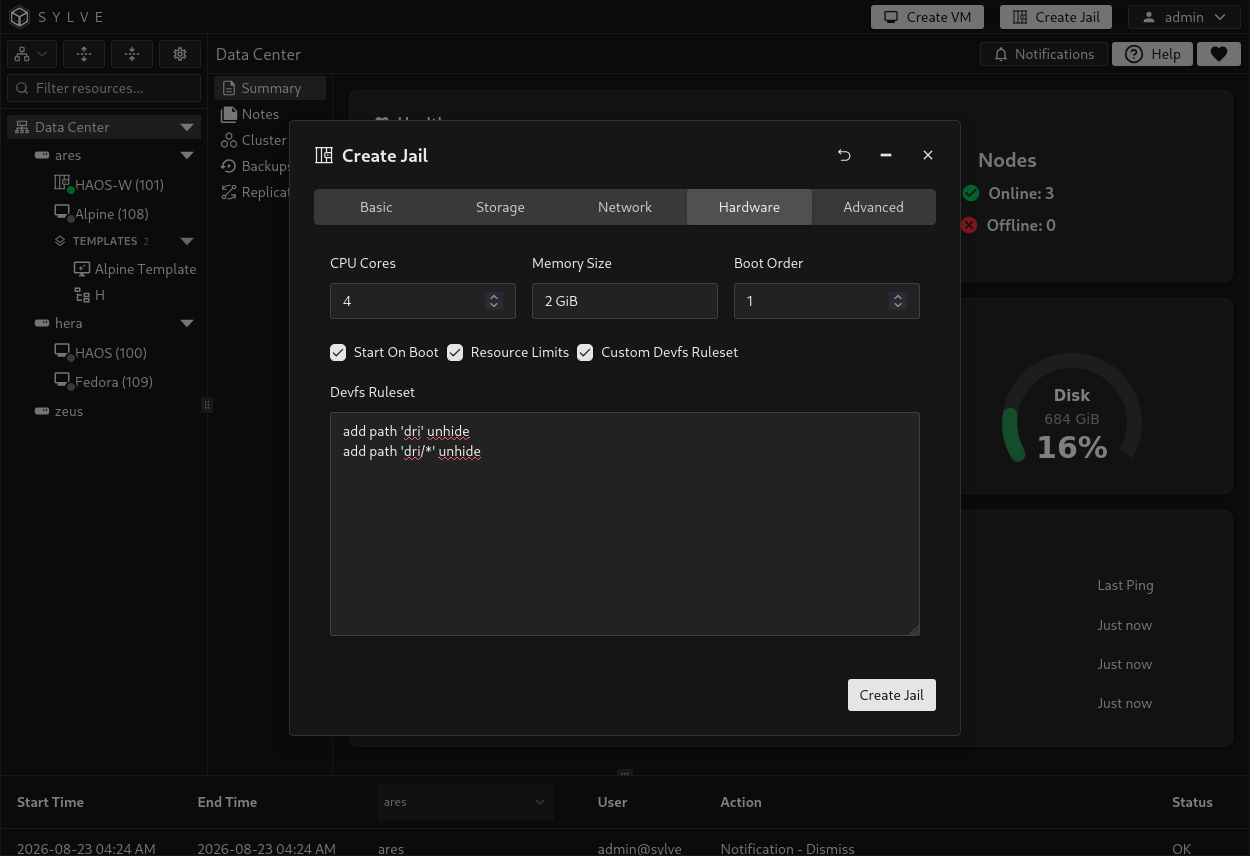
Advanced
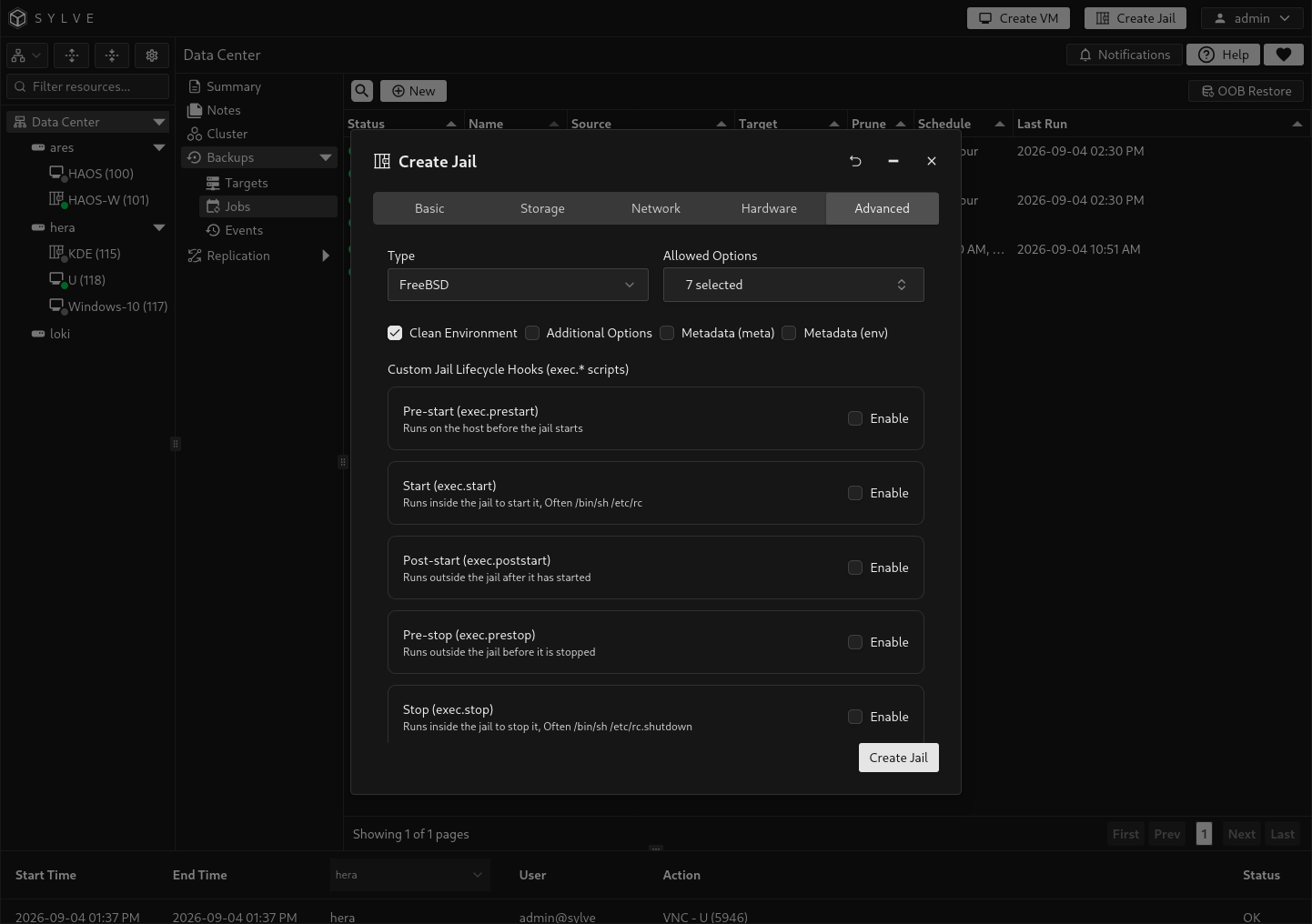
Section titled “Advanced”The Advanced tab controls the jail type, allowed capabilities, environment handling, raw jail configuration, metadata, and lifecycle hooks.
Choose the jail type
Section titled “Choose the jail type”| Type | Default behavior |
|---|---|
| FreeBSD | Enables the normal FreeBSD capability set. Sylve automatically uses /bin/sh /etc/rc and /bin/sh /etc/rc.shutdown when no custom Start or Stop hook is enabled. |
| Linux | Enables Linux compatibility mount capabilities and does not add the FreeBSD service commands. Linux jails require a compatible Linux root filesystem and host compatibility support. |
Changing the type reapplies its default allowed options. Make this choice before customizing those fields.
Allowed options and clean environment
Section titled “Allowed options and clean environment”Allowed Options controls the allow.* capabilities written into the jail configuration. The defaults cover common networking and service needs. Add powerful capabilities such as filesystem mounting, routing, VMM access, or host-time changes only when the workload requires them.
Clean Environment instructs the jail runtime to start with a clean environment instead of inheriting the host process environment. Keep it enabled unless a deliberate host environment dependency is required.
Additional options
Section titled “Additional options”Enable Additional Options to append raw jail configuration inside the generated jail block. This escape hatch supports settings not exposed elsewhere in the wizard.
Metadata
Section titled “Metadata”The Metadata (meta) and Metadata (env) editors accept one KEY=VALUE pair per line. Each block is limited to 2048 characters. Keys and values must both be present, and each non-empty line must contain exactly one equals sign.
Use metadata for information or environment values that need to be retained with the jail definition. Do not place secrets here unless the surrounding storage and access controls are appropriate for them.
Lifecycle hooks
Section titled “Lifecycle hooks”Each hook can be enabled independently:
| Hook | Execution context |
|---|---|
Pre-start (exec.prestart) |
Runs on the host before the jail starts. |
Start (exec.start) |
Runs inside the jail as its start command. |
Post-start (exec.poststart) |
Runs on the host after the jail starts. |
Pre-stop (exec.prestop) |
Runs on the host before the jail stops. |
Stop (exec.stop) |
Runs inside the jail as its stop command. |
Post-stop (exec.poststop) |
Runs on the host after the jail stops. |
An enabled hook must contain a non-empty script. For a FreeBSD jail, leave Start and Stop disabled to use the normal service lifecycle automatically. Enabling either one replaces its corresponding default command with the supplied script. Host-side hooks run with host privileges, so treat their contents as privileged automation.
Finish creation
Section titled “Finish creation”Review every tab, then select Create. Sylve validates the identity across VMs and jails, checks the pool and root source, verifies switch and network-object availability, validates limits and advanced configuration, and refuses to overwrite an existing jail dataset.
Creation can take time because the selected root filesystem is copied into a new ZFS dataset. If any later provisioning step fails, Sylve attempts to remove the partially created dataset, database records, network objects, runtime files, and devfs rules.
After creation, open the jail from the sidebar to review its configuration. Start it when you are ready, then use the Jail Console to verify the hostname, networking, resolver configuration, and services inside the guest.