

Migration
Jail migration moves a jail from its current cluster node to another online node. Sylve transfers the jail’s managed ZFS dataset root, imports its configuration on the destination, moves workload ownership, and cleans up the source only after a successful cutover.
How migration works
Section titled “How migration works”Migration is a staged operation:
- Sylve validates the destination and creates migration snapshots.
- It sends the initial ZFS data while the source jail can remain running.
- It validates the destination again immediately before cutover.
- It stops a running jail and sends the final incremental changes.
- It transfers the shared guest-ID claim to the destination, then imports the jail there and restores its previous running or stopped state.
- It updates the remaining cluster placement state and removes the source copy only after the destination is committed.
The initial transfer usually contains most of the data. The interruption window begins when the source is stopped and includes the final sync and destination startup.
What moves with the jail
Section titled “What moves with the jail”Migration transfers the jail’s managed root as a recursive ZFS dataset tree. The root remains in the same ZFS pool namespace on the destination, including any child datasets beneath it.
Before transfer, Sylve writes the current jail metadata into the managed storage. The destination uses that metadata to restore the jail registration and supported configuration, including its identity, runtime options, hooks, storage records, and network definitions.
Migration also preserves the jail’s numeric ID, name, type, resource limits, startup settings, resolver content, DevFS rules, allowed options, metadata, execution timeout, lifecycle hooks, storage definitions, and supported network settings.
The migration does not rewrite host-specific paths or devices. Review these settings before moving a jail:
| Item | Required preparation |
|---|---|
| ZFS pool | The pool containing the jail’s managed root must exist on the target with the same name. |
| Network bridges | Every bridge used by a jail interface must already exist on the target. |
| CPU assignment | Sylve recalculates the jail’s CPU set for the target while preserving its configured core count. The destination must have enough logical CPUs for that allocation. |
| Fstab host paths | Any host path referenced by a custom fstab entry must exist on the target. Preflight does not validate these paths. |
| Devfs devices | Devices exposed by custom devfs rules must exist and be appropriate on the target. Preflight does not validate equivalent hardware. |
| Host-dependent hook scripts | Host-side lifecycle hooks must be valid on the destination node. |
Inherited networking and a jail with no network interface do not require a destination bridge. For a VNET jail, a missing bridge is a blocking error rather than a warning because the destination cannot safely recreate the interface without it.
Open the migration dialog
Section titled “Open the migration dialog”Open the jail’s Summary page and select Migrate. The button is available only when the cluster contains another eligible online node. The source node is excluded from the target list.
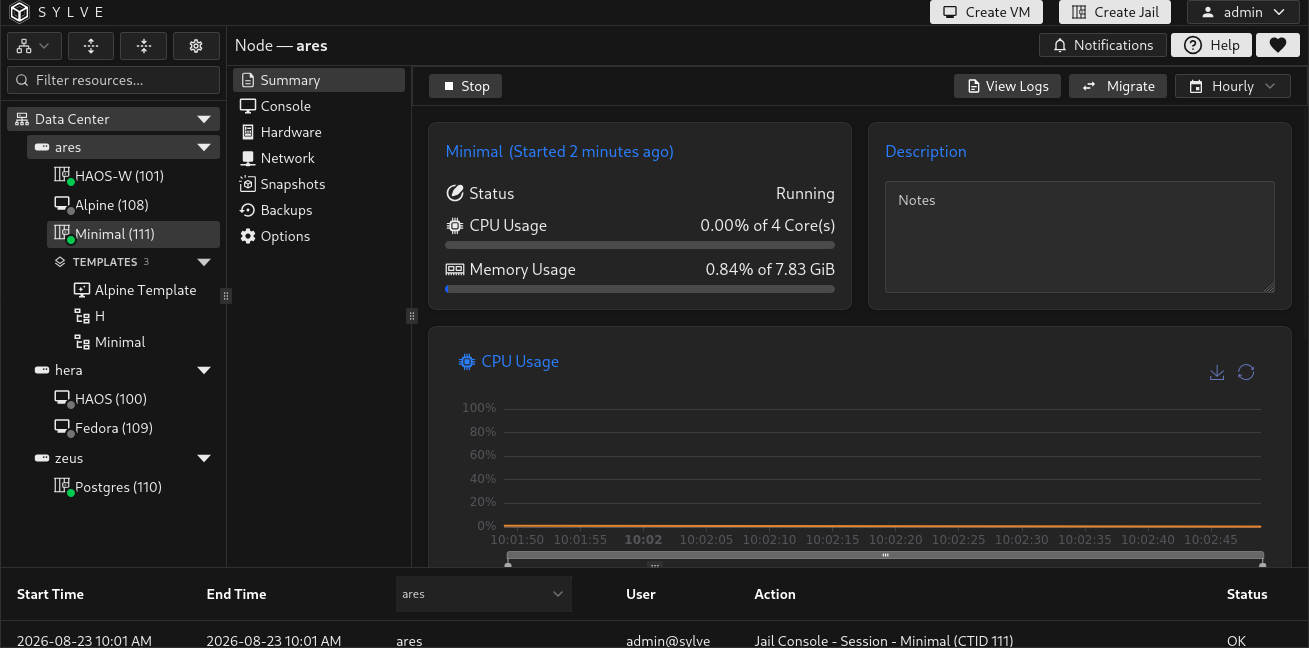
The dialog lists each eligible target by hostname and shows its reported CPU core count and RAM. Select a node to begin validation. If no other online node is available, the dialog shows No other online nodes available in the cluster.
Selecting a target starts preflight validation automatically. The dialog reports one of these outcomes:
| Outcome | Meaning |
|---|---|
| Migration not allowed | One or more hard requirements failed. Resolve every listed reason before migration can start. |
| Ready to migrate | All blocking checks passed. |
| Warnings | Migration can continue, but the listed condition requires review. |
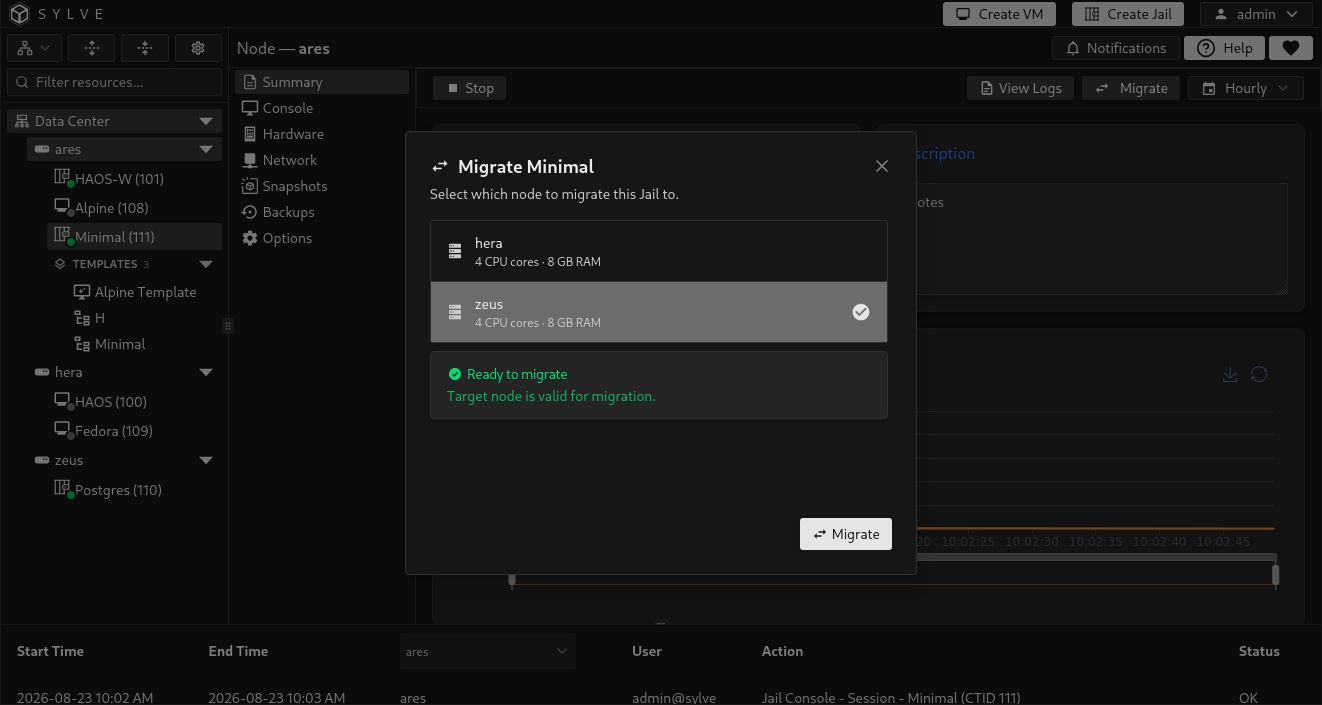
Migration walkthrough
Section titled “Migration walkthrough”This walkthrough shows a complete migration of a running jail, beginning with target selection and validation and ending on the jail’s Summary page on the destination node. The progress view distinguishes the initial replication from the final cutover.
Walkthrough result
Section titled “Walkthrough result”The recording demonstrates the workflow rather than providing a migration-speed benchmark. Total transfer time and the shorter interval during which the jail is stopped depend on the workload, stored data, and cluster environment.
ZFS dataset size is not an exact prediction of bytes transferred or elapsed time. Recursive snapshots, child datasets, compression, data changed during initial replication, and cluster link speed all affect the result.
Before you migrate
Section titled “Before you migrate”Prepare and verify the target before beginning:
| Requirement | Why it matters |
|---|---|
| Another online cluster node | The destination must be a different online member of the same Sylve cluster. |
| Matching ZFS pool name | Sylve receives the jail’s managed root into the same pool namespace used on the source. It does not choose a replacement pool. See ZFS Pools. |
| Matching network bridges | Each bridge used by the jail must exist on the destination. Recreate the corresponding Standard Switch or Manual Switch there first. |
| No guest-ID collision | The Jail ID must not already be used by a jail or VM on the target. VM IDs and Jail IDs share one guest namespace. |
| Working cluster connectivity | Sylve uses authenticated node-to-node access to inspect the target and transfer ZFS data. |
| Usable backup targets | Every target used by an enabled backup job for this jail must exist, be enabled, and validate successfully from the destination node. |
| No competing work | A lifecycle task, backup event, replication event, HA transition, or another migration for this jail blocks the move. |
| Replication fully disabled | Disable the jail’s replication policy. If policy deletion or another transition is active, wait for it and the replication lease to clear before retrying. A stable disabled policy can remain and follows the jail to the destination. |
The Migrate action remains disabled until validation allows the move. Validation is repeated before cutover so a target that became unavailable or incompatible during the initial transfer does not proceed silently.
Review validation results
Section titled “Review validation results”Most jail migration problems are blocking because they would prevent the destination from importing or running the jail safely.
Common blocking results include:
- A required ZFS pool is missing or cannot be checked.
- A required network bridge is missing or cannot be checked.
- The target already contains a VM or jail with the same numeric ID.
- The target is offline or cluster authentication is unavailable.
- A target used by an enabled backup job is missing, disabled, or cannot be validated from the destination.
- Another lifecycle, backup, replication, HA, or migration operation is active.
- A replication policy or replication lease still protects the jail.
When validation is blocked, the dialog displays each reason under Migration not allowed and keeps the Migrate button disabled. Select another target, or correct the reported requirements and reopen the dialog to rerun validation.
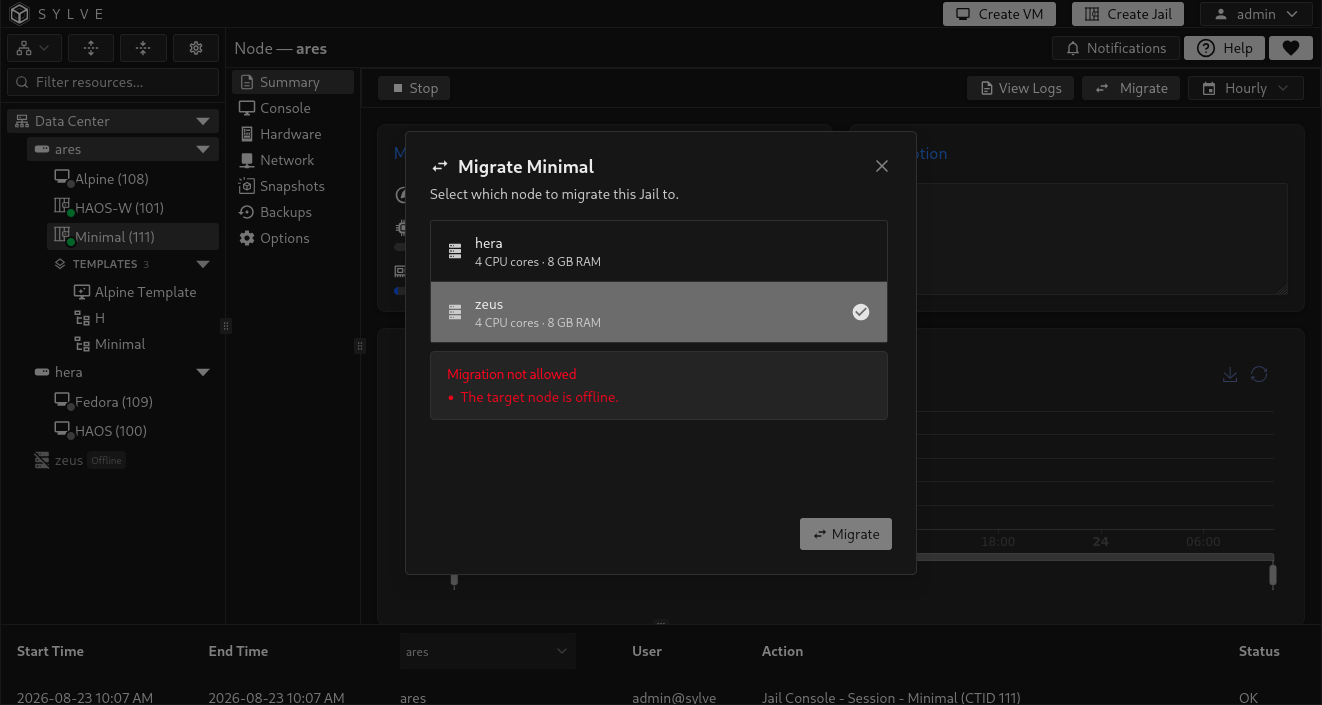
The current jail-specific preflight warning is:
| Warning | Destination behavior |
|---|---|
| Stale jail dataset on target | A leftover dataset at the same managed jail path is replaced by the migrated data. Investigate it before continuing if it could contain anything that must be retained. |
Warnings appear below the successful validation result. They do not disable migration, so reviewing them is the operator’s responsibility.
Start the migration
Section titled “Start the migration”- Open the jail’s Summary page and select Migrate.
- Select the destination node.
- Wait for validation to finish.
- Resolve every blocking reason and review every warning.
- Select Migrate to queue the operation.
- Follow the progress dialog until the task completes.
The dialog changes to a phase-by-phase progress view after the task is queued. Dataset transfer phases show a percentage when ZFS reports one. The dialog can be closed while migration continues in the background. Reopen it from the jail Summary page to resume the active task’s progress view.
Understand each phase
Section titled “Understand each phase”| Phase | What Sylve does |
|---|---|
| Preflight check | Rechecks cluster state, target readiness, guest identity, storage pools, network bridges, and backup targets used by enabled jobs for this jail. |
| Initial replication | Creates migration snapshots and transfers the managed jail dataset root recursively while the source can remain running. |
| Stop source | Records whether the jail was running and stops it when required for cutover. |
| Final sync | Transfers changes made since the initial replication. This phase is part of the interruption window. |
| Transfer ownership | Moves the jail’s shared guest-ID claim to the destination before the jail is imported there. |
| Start on target | Imports the jail metadata and datasets. A previously running jail is started; a stopped jail remains stopped. |
| Policy adjustment | Reassigns any disabled replication policy and rebinds the jail’s backup-job runners to the destination. |
| Cleanup source | Removes migrated jail datasets and local jail metadata from the source. |
| Finalize | Confirms that migration protection has been released and marks the task complete. |
Transfer duration depends on the amount of referenced data, retained snapshots, ZFS compression, changes made during the initial replication, and cluster network speed. Provisioned or apparent size alone does not predict the number of bytes sent.
Cancellation and recovery
Section titled “Cancellation and recovery”Cancellation can be requested only during Preflight check or Initial replication. After cutover begins, cancellation is disabled because the source may already be stopped and the target state may be in the process of being committed.
Select Cancel Migration while it is available to request cancellation. The request is not complete until the task reports Migration cancelled. During this period the button changes to Cancellation requested and cannot be selected again.
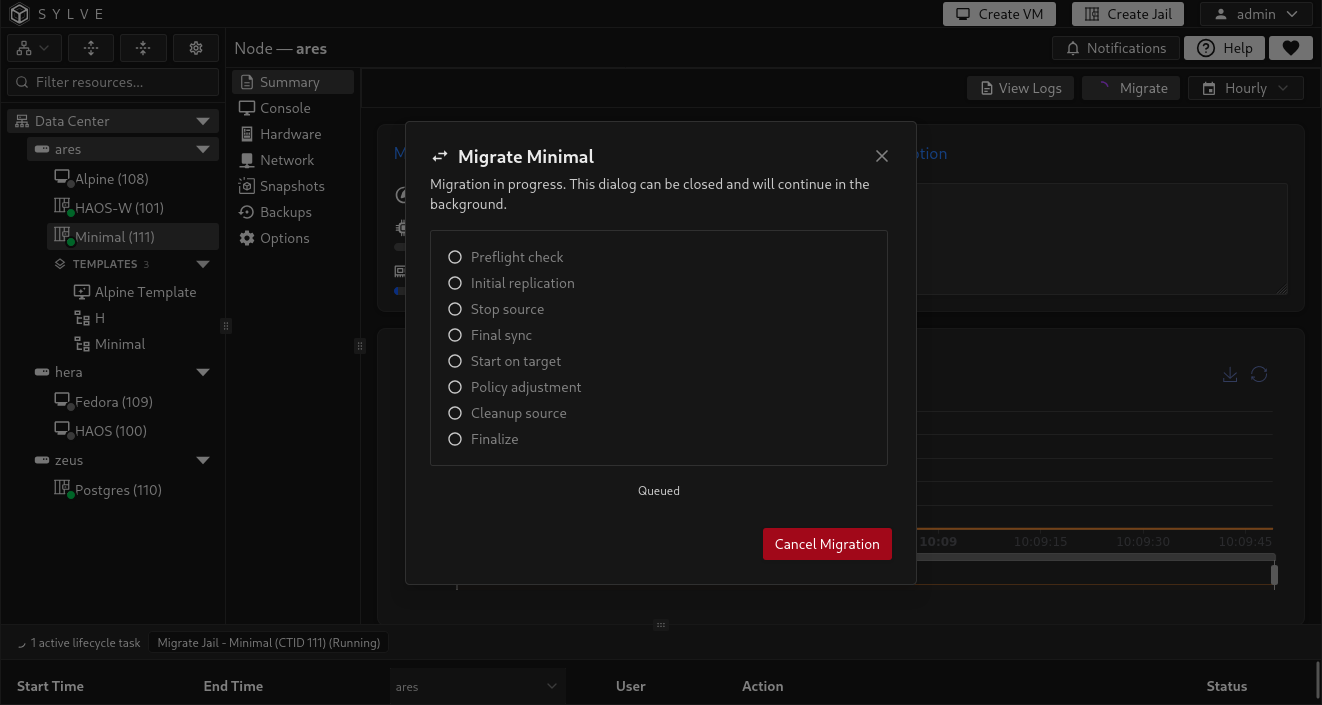
Closing the dialog does not cancel the task. The migration remains visible when the dialog is reopened.
If a failure occurs after cutover, Sylve retains the migration guard and retries recovery safely. Conflicting jail, backup, and replication operations remain blocked while recovery is pending. Do not manually start, import, destroy, or modify either copy of the jail or its datasets until the task reaches a terminal state.
Verify the destination
Section titled “Verify the destination”After a successful move, Sylve opens the jail on its target node. Verify:
- The jail state matches its state before migration.
- Every expected managed dataset and child dataset is present.
- VNET interfaces use the intended destination bridges.
- Static addressing, DHCP, SLAAC, and resolver behavior still work as expected.
- Custom fstab mounts, devfs devices, and host-side lifecycle hooks are valid on the destination.
- The assigned CPU set matches the destination topology and the intended core count.
- The Jail Console opens and the workload’s services are healthy.
The completed task can still report warnings. Sylve shows them in a notification before redirecting to the jail’s Summary page on the destination.