

Targets
An iSCSI target makes storage on this node available to another computer as a block device over the network. The remote computer, called the initiator, can then format the device, create a filesystem, or use it as application storage. Enable the iSCSI system service in System Settings → Services before configuring targets. Enabling it writes the current Sylve configuration, starts the required iSCSI services when necessary, and connects saved initiator entries.
In Sylve, a target exposes one or more ZFS volumes. A ZFS volume is the underlying block device. A LUN is the number by which a target presents that volume to a remote client. A portal is the IP address and port on which the target listens.
Before you begin
Section titled “Before you begin”Create a ZFS volume first. Do not use the same volume as a local filesystem, a virtual-machine disk, or a LUN on another target. The Targets page only offers ZFS volumes that are not already assigned to an iSCSI LUN and hides volumes used for Sylve virtual machines.
Create a target
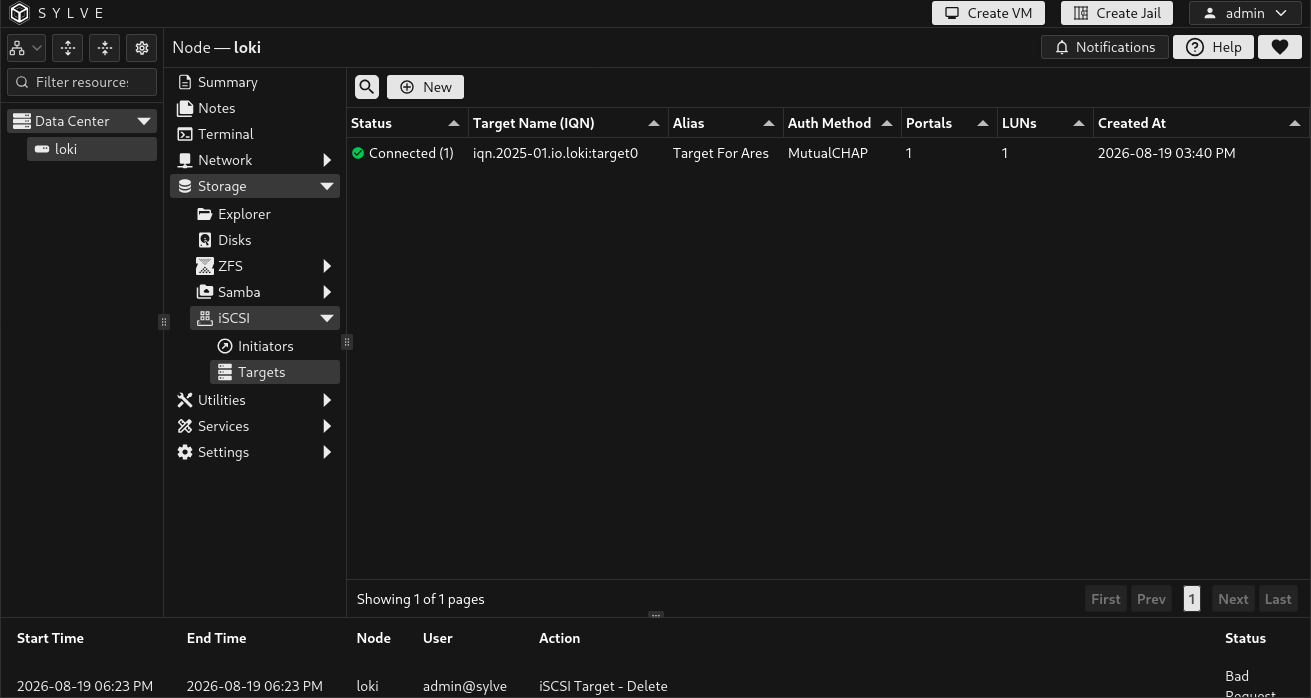
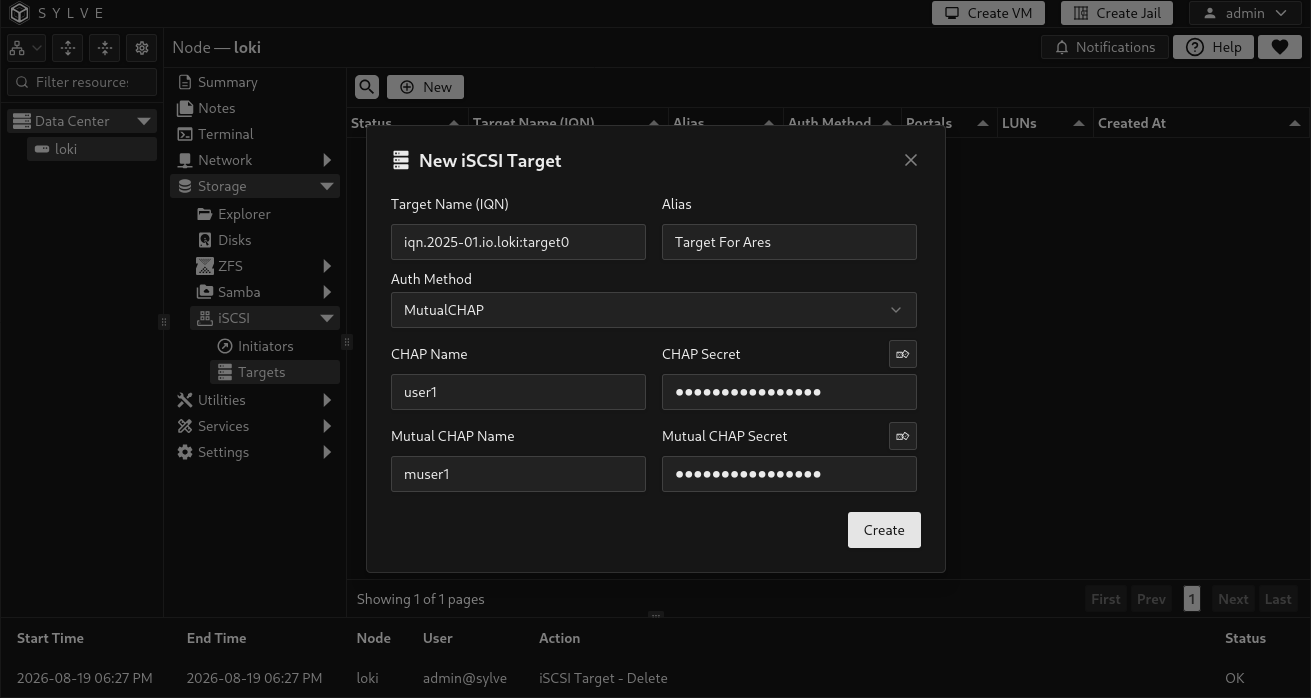
Section titled “Create a target”Choose New to create the target identity and its access method. The target is initially only a definition. Add its portal and LUNs afterwards from the edit dialog.
| Field | What it controls |
|---|---|
| Target Name (IQN) | The unique iSCSI name remote clients discover and connect to, such as iqn.2025-01.io.example:archive. It is required, unique, and may contain up to 223 ASCII characters without spaces or configuration punctuation. |
| Alias | Optional human-readable name shown to iSCSI clients, such as Archive Storage. It does not replace the IQN. |
| Auth Method | Selects access authentication: None, CHAP (one-way), or MutualCHAP (two-way). |
| CHAP Name | Username the remote initiator presents to authenticate to this target. Required for CHAP and MutualCHAP. |
| CHAP Secret | Secret paired with the CHAP name. It must be 12 to 16 printable ASCII characters. Sylve can generate a compliant secret from the form. |
| Mutual CHAP Name | Identity the target presents back to the initiator. Required only for MutualCHAP. |
| Mutual CHAP Secret | Secret paired with the mutual identity, required only for MutualCHAP and also 12 to 16 printable ASCII characters. |
Use CHAP for a normal authenticated target. Use MutualCHAP only when the remote initiator is configured to authenticate the target too. Choose None only on a trusted isolated storage network with access controlled elsewhere.
Add a portal
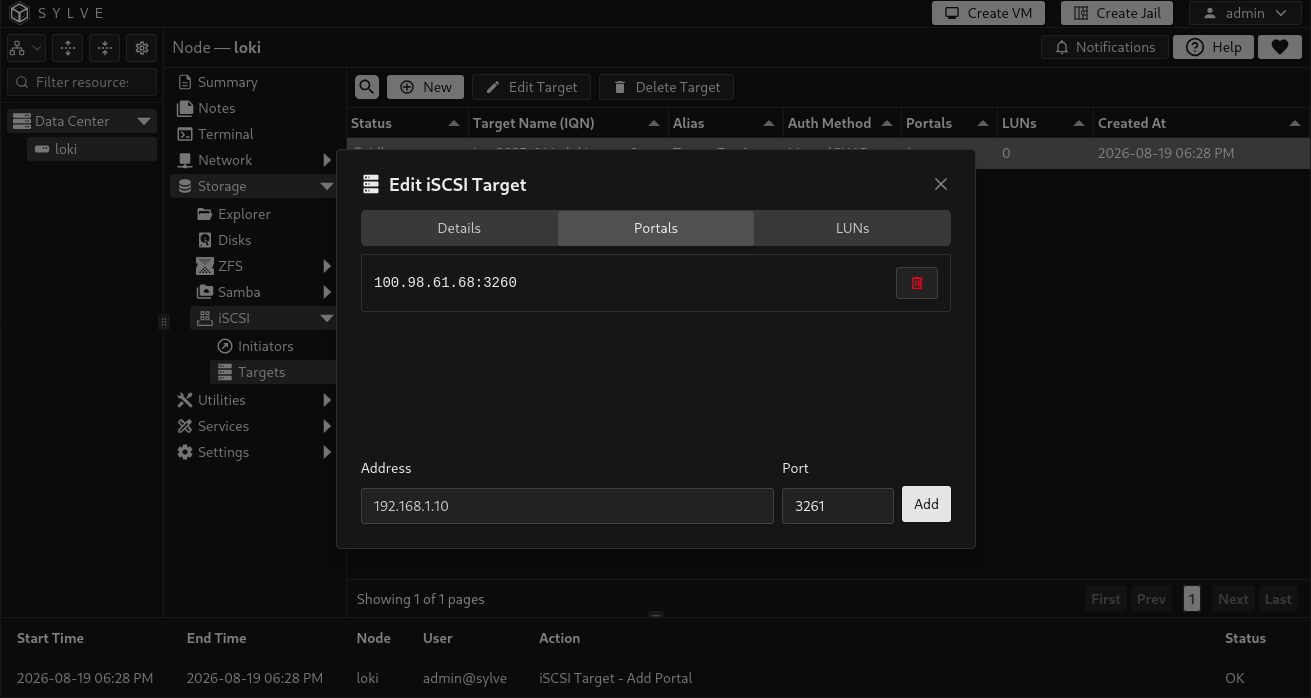
Section titled “Add a portal”Select one target in the table, choose Edit Target, then open the Portals tab. Add each IP address through which initiators may reach the target.
| Field | What it controls |
|---|---|
| Address | Required IPv4 or IPv6 address on this node. Hostnames are not accepted for target portals. Use a specific storage-network address rather than a public address. |
| Port | TCP listen port. The conventional iSCSI port is 3260; Sylve accepts 1 through 65535. The same address and port cannot be added twice to one target. |
A target can have more than one portal. Targets that use the same address and port share a listener, but keep separate authentication. Removing a portal does not affect other targets that use it. Select a portal address to copy it. A target with no portals is not available to initiators.
Do not mix wildcard and specific addresses on the same port. IPv4-mapped IPv6 addresses are not supported. Link-local IPv6 addresses need an interface-name zone, such as fe80::1%em0.
Add ZFS volumes as LUNs
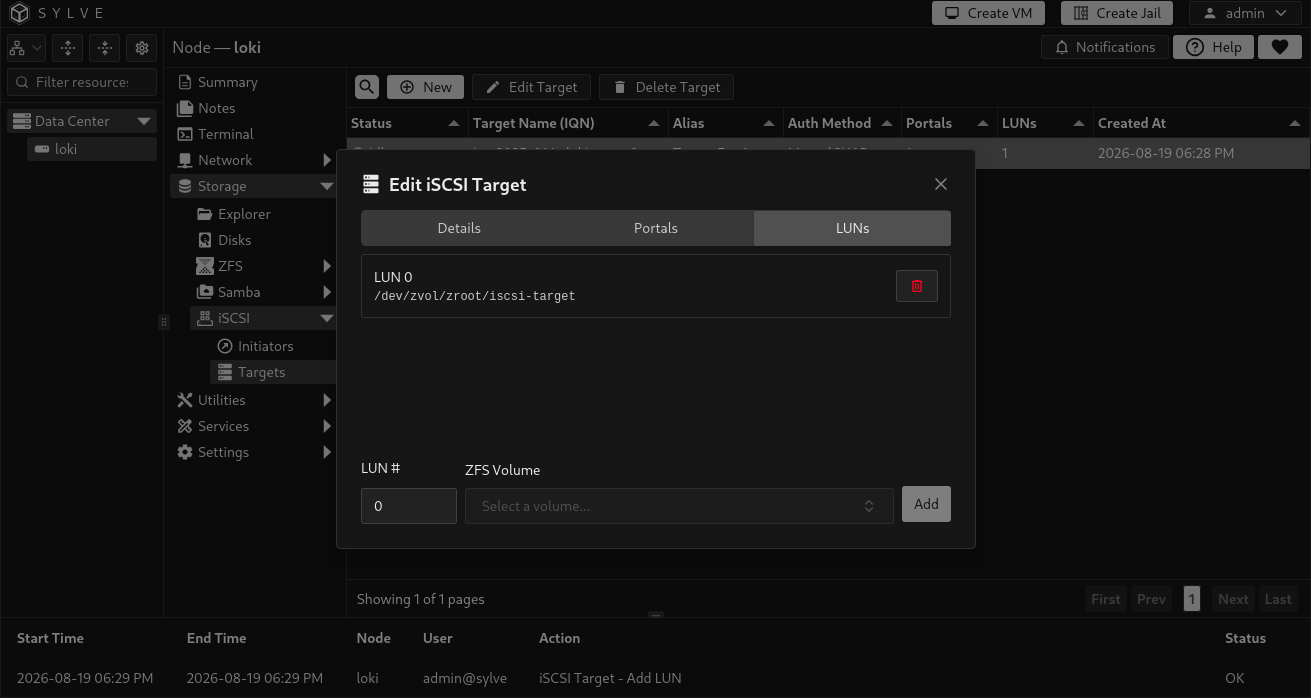
Section titled “Add ZFS volumes as LUNs”Open the LUNs tab in the same target editor. Select a ZFS volume and give it a LUN number. Remote clients see the LUN as a disk after they connect.
| Field | What it controls |
|---|---|
| LUN # | Integer from 0 through 1023, used by the remote initiator to identify this disk within the target. Start at 0 for a simple one-volume target. Each number must be unique on that target. |
| ZFS Volume | The ZFS volume exported as /dev/zvol/<volume name>. A volume can belong to only one Sylve iSCSI LUN. |
Adding or removing a LUN changes only the iSCSI export. It does not create, delete, resize, or wipe the ZFS volume. Before removing a LUN, safely unmount or detach it from every remote client.
Monitor and manage targets
Section titled “Monitor and manage targets”The Status column reports Connected (n) when n remote initiator sessions are active, otherwise Idle. Sylve refreshes target-session information every three seconds while the page is visible.
Editing a target, portal, or LUN updates the managed ctld configuration. Sylve starts or reloads targets only when iSCSI is enabled. Disabling targets does not stop iscsid or detach initiator storage.
Sylve refuses to delete a target while one or more remote initiators are connected to it. Disconnect those clients and confirm the target is Idle first. If Sylve cannot safely read the target session state, it also leaves the target unchanged. Once deletion is allowed, it removes the target’s portal and LUN assignments from Sylve but leaves the underlying ZFS volumes intact.
If a change is saved but runtime checks fail, the page shows a pending warning. Sylve keeps the saved change and does not roll back a partial apply. Correct the reported problem, then retry a safe edit or the same service state.
Extra target configuration
Section titled “Extra target configuration”Local administrators can open Target Settings on Storage → iSCSI → Targets to add independent native ctl.conf stanzas after the generated targets. The dialog applies to the target service on this node, not one selected target. This is a bounded extra-config field, not an arbitrary configuration editor. It cannot insert clauses inside a managed target. An empty field removes the extra block.
The supported grammar is based on FreeBSD releng/15.0 token.l and parse.y. Use auth-group, portal-group, transport-group, lun, target, or controller. Define groups and named LUNs before their references. Each user target needs an explicit user portal-group; each controller needs an explicit user transport-group. Empty groups are permitted. An unused, non-redirecting group does not open its listeners, but its endpoints remain reserved.
- Global directives, UCL, includes, implicit or explicit default listener groups,
listen-iser,foreign,offload,tag, and targetportare not supported. - Group names starting with
pg-orag-are reserved, without regard to case. Do not redefine the built-in auth groups or reuse a managed target name. Built-inno-authenticationis an explicit auth choice. - Use literal IPv4 or IPv6 listener addresses. Do not use hostnames, IPv4-mapped IPv6, or numeric zones. Link-local IPv6 needs a known interface-name zone; other addresses must not have a zone. TCP listeners cannot overlap managed or other user listeners, including unused groups and other protocols.
- Omitted ports are
3260for iSCSI,4420for NVMe/TCP, and8009for NVMe discovery/TCP. Saved editor text stays unchanged. Only parsed listener values are normalized in the file, with quoted canonical addresses and explicit ports. - Native backslashes are literal, not escape sequences. Empty quotes, quoted control characters, escaped quotes, and a backslash before a closing quote are rejected. The field limit is 256 KiB of UTF-8 text; the request limit is 1 MiB.
- LUNs and namespaces support
block(the default) orramdisk. A block path must be absolute and must exist as a regular file or device. A ramdisk needs a size and no path. LUN IDs start at0; namespace IDs start at1; both are limited to1023. Serial numbers have a 16-byte limit; device IDs have a 64-byte limit. - Options must use identifier-like keys and cannot replace CTL ownership or core inventory fields. Names, paths, aliases, and option values cannot contain
<,>, or&, because native inventory cannot safely report these values. Other syntax and values must pass the native validator.
Sylve checks the complete merged file before saving. A validation error leaves the DB and file unchanged. A saved change with HTTP 202 means runtime work is pending, not that the text was rejected. Repair the problem, then select Save again; unchanged text also retries. Disabling iSCSI prevents starts and reloads during saves and target edits. A failed stop keeps the preceding file and remains pending.
| Status | Meaning |
|---|---|
| Checked | The desired file and observable runtime checks match. This does not confirm reload completion, authentication, redirects, or daemon-only options. |
| Pending | The desired file or observable runtime checks do not match. |
| Invalid | The saved or merged configuration fails validation. The saved text remains available for repair. |
| Disabled | iSCSI is disabled, the desired file matches, and the target daemon is stopped. |
Native examples
Section titled “Native examples”Use existing backings and choose addresses on your storage network. These examples disable authentication; use them only on a protected test network. Do not give separate exports concurrent write access to one backing.
NVMe/TCP uses namespace IDs starting at 1:
transport-group user-nvme { listen tcp 192.0.2.10}controller nqn.2026-10.io.example:storage { transport-group user-nvme auth-group no-authentication namespace 1 { path /dev/zvol/tank/nvme-volume }}The omitted TCP port above is 4420. Namespaces accept the same backing properties as iSCSI LUNs. A separate user iSCSI target can use a port that does not overlap managed listeners:
portal-group user-iscsi { listen 192.0.2.10:3261}target iqn.2026-10.io.example:extra { portal-group user-iscsi auth-group no-authentication lun 0 { path /srv/iscsi/extra.img }}Upgrade and recovery
Section titled “Upgrade and recovery”Back up /etc/ctl.conf before the first shared-listener upgrade. Use a maintenance window because clients can disconnect. If Sylve reports iscsi_listener_normalization_requires_stop, disable targets, confirm the stop, then enable them.
After a zvol rename, disconnect clients, restore the backing path, then remove and add the affected LUN assignment. This does not delete the zvol. Test client I/O before use.
Take an operator snapshot before migration. .pre-sylve is not a backup of the preceding generated file. If saved extra text is invalid at startup, Sylve continues startup and can use the last owned file only after independent syntax, listener, and backing checks. Without a valid owned file, it skips target startup. Initiator initialization remains separate. A failure after file replacement leaves the candidate file on disk, not a previous generated copy.
Aliases and CHAP values cannot contain double quotes or control characters.