

NAT Rules
Firewall → NAT Rules manages PF address translation separately from Traffic Rules. DNAT and ordinary masquerade rules change an address or port without granting access, so a published service still needs an appropriate Traffic Rule and a masqueraded network still needs an outbound traffic policy. Policy-routed SNAT and BINAT are the exception: Sylve renders their companion PF pass-and-route rules, so the matching traffic does not need a duplicate Traffic Rule.
The example rules
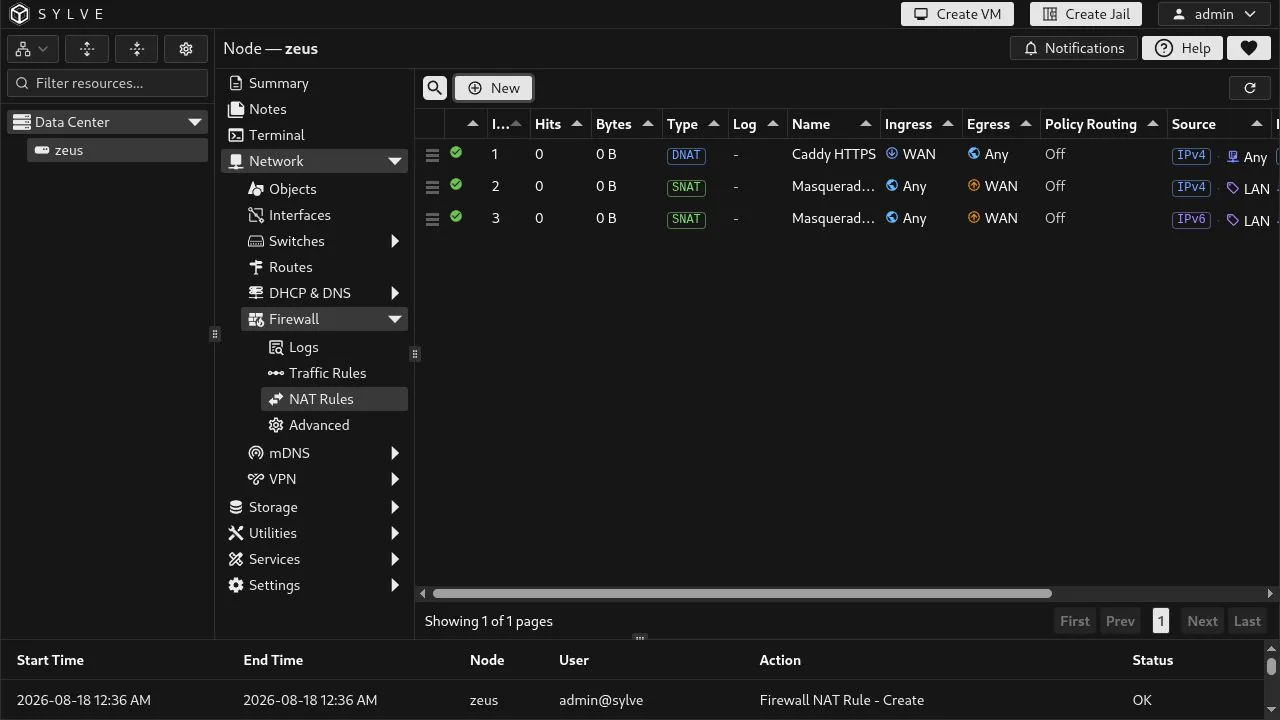
Section titled “The example rules”This node has one inbound Caddy rule and one interface-address SNAT rule for each LAN address family. The two SNAT rules are commonly called masquerade rules because PF substitutes the address currently assigned to WAN.
| Rule | Purpose |
|---|---|
| Caddy HTTPS | Redirect inbound IPv4 TCP port 443 on WAN to the Caddy host at LAN Caddy Address. |
| Masquerade LAN IPv4 | Translate packets sourced by LAN Network as they leave WAN, using the WAN IPv4 address. |
| Masquerade LAN IPv6 | Translate packets sourced by LAN IPv6 Network as they leave WAN, using the WAN IPv6 address. |
The Index column is the NAT evaluation order. Drag a row by the handle in the first column to reorder it. Hits and Bytes are PF runtime counters for a rule; use them to confirm that real packets are reaching the expected translation.
Publish Caddy with DNAT
Section titled “Publish Caddy with DNAT”A DNAT rule is PF rdr: it matches traffic arriving on an ingress interface and redirects its destination to one internal host. The Caddy example is scoped to WAN, IPv4, TCP, and destination port 443. Its source and original destination are left as Any, which means any client connecting to WAN on HTTPS can match it.
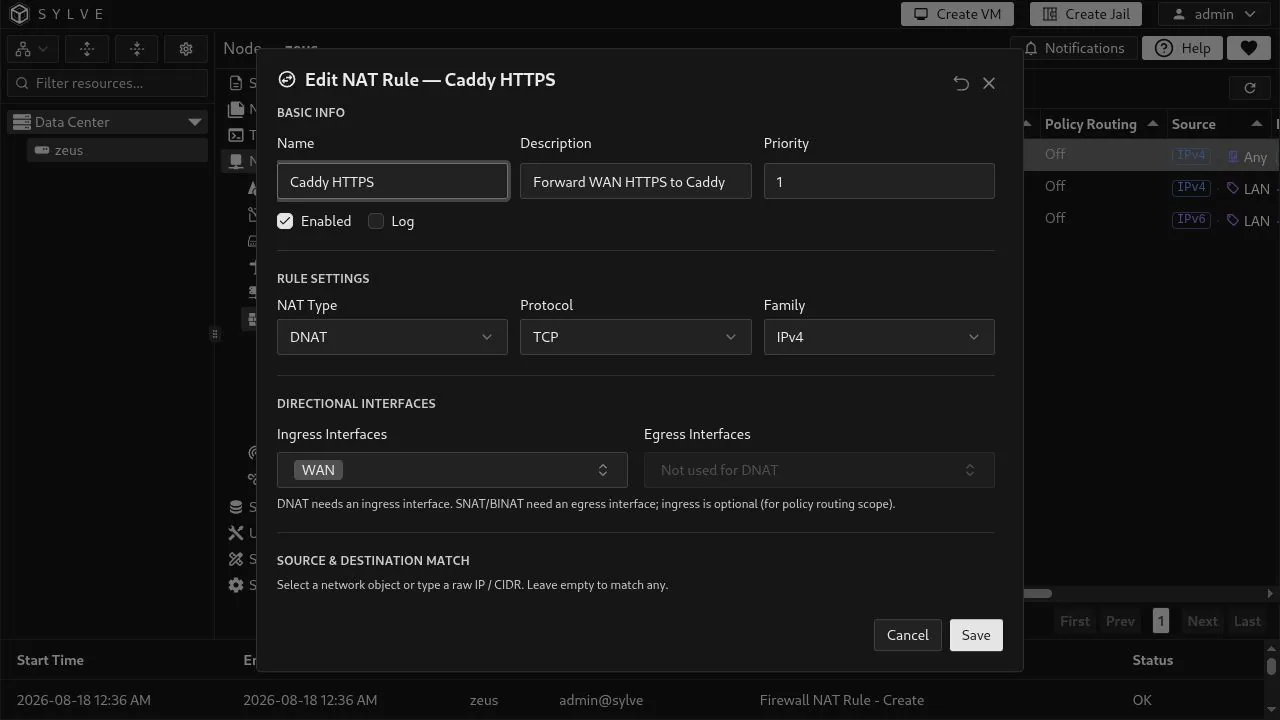
The DNAT target must be a single host address, not a network or List object. Here it is the reusable LAN Caddy Address Host object. Match Destination Port is the public port to accept. Rewrite To Port is optional: leave it empty when Caddy listens on the same port, or set it when the internal service uses a different port.
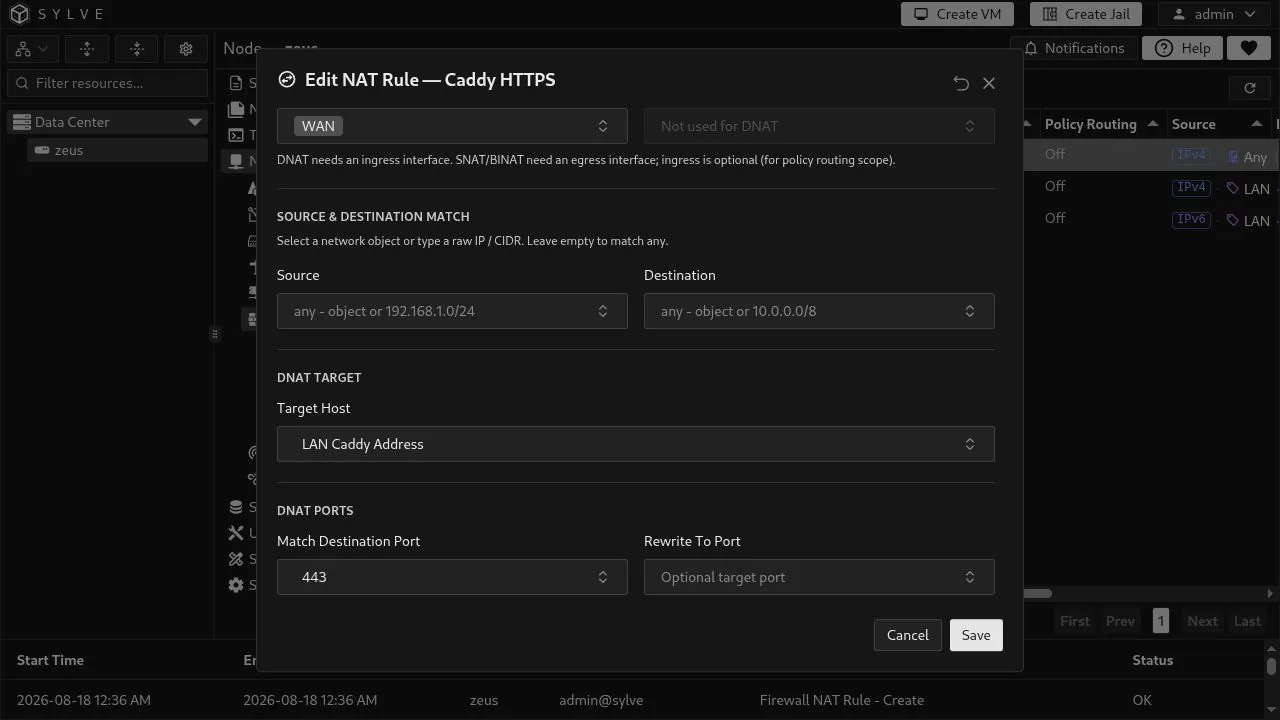
For this rule to expose Caddy safely, add a narrow inbound Traffic Rule that permits the same intended traffic to the Caddy host. DNAT performs the redirection; the Traffic Rule supplies the pass or block decision.
Masquerade LAN with SNAT
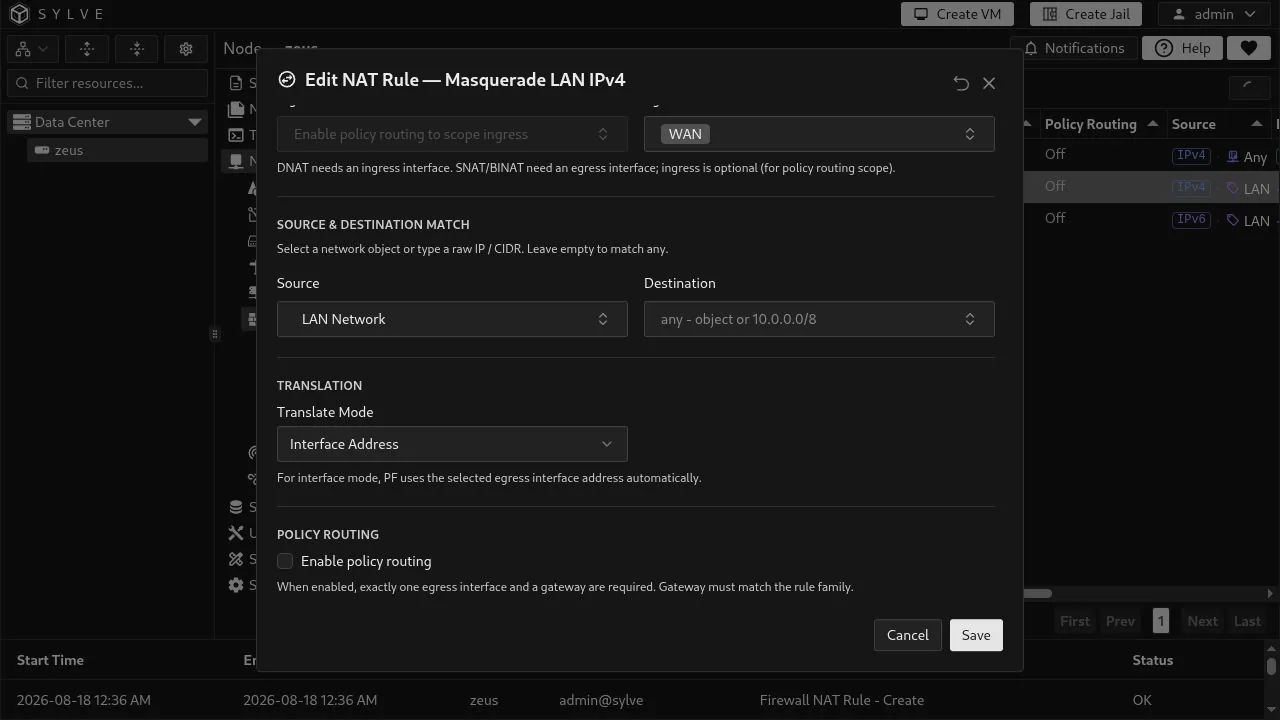
Section titled “Masquerade LAN with SNAT”The form calls this SNAT. Choose Interface Address as the translation mode to make it a masquerade rule: PF uses the selected egress interface’s current address automatically. This is usually the right choice for an uplink that receives its address through DHCP or SLAAC, because the rule follows an address change without editing the rule.
The IPv4 example matches LAN Network, leaves Destination as Any, uses WAN as its egress interface, and has policy routing off. The IPv6 rule has the identical shape but uses LAN IPv6 Network and the IPv6 family.
Use a separate rule for IPv4 and IPv6 when each subnet needs its own source object and family. NAT66 can be useful when the upstream expects it, but it is not a substitute for routed IPv6 when routing is available. Confirm the upstream network’s expectation before adding IPv6 translation.
Choose the right NAT type
Section titled “Choose the right NAT type”| Type | Direction and result |
|---|---|
| DNAT | Requires an ingress interface. Redirects the destination of matching incoming packets to one internal host, optionally changing the port. |
| SNAT | Requires an egress interface. Rewrites the source of matching outgoing packets to either that interface’s address or one specified host address. |
| BINAT | Requires an egress interface. Creates a bidirectional address mapping. Use it only when a one-to-one mapping is what the network requires. |
All types can constrain the address family, protocol, source, and destination. Choose a literal IP or CIDR for a one-off rule, or choose a Host, Network, FQDN, or List object for a reusable endpoint match. A raw value and an object are alternatives for the same field, not additive filters.
DNAT ports are available only with TCP or UDP. SNAT and BINAT do not expose the redirect-port controls because they translate addresses, not a destination service port.
Translation and policy routing
Section titled “Translation and policy routing”SNAT and BINAT provide two translation modes:
- Interface Address uses the selected egress interface address. This is the masquerade mode used by the LAN examples.
- Specific Address translates to one literal host address or a single-address Host object.
Policy Routing is available only for SNAT and BINAT. Enabling it requires exactly one egress interface and a gateway that matches the rule’s family. Sylve emits the matching PF pass-and-route companion rules, which both allow the selected traffic and direct it through that gateway. Do not add a duplicate Traffic Rule for that same policy-routed path. Use it only when traffic must leave through a specific uplink; leave it off for ordinary masquerade rules.
Use Route Helper for return routes
Section titled “Use Route Helper for return routes”Select one policy-routed SNAT or BINAT rule and choose Route Helper in the toolbar. Sylve examines the rule’s source and the selected egress path, then opens a prefilled Static Route form with one or more possible return-route suggestions.
This is a starting point, not an automatic route change. Inspect the suggested destination, FIB, next hop, and interface, then save the route only if it describes the return path you need. The helper is available only when policy routing is enabled on a SNAT or BINAT rule with one egress interface and an explicit IPv4 or IPv6 family. If Sylve cannot derive a usable route from the rule’s source, it reports that no suggestion is available.
Operational details
Section titled “Operational details”- Enabled controls whether the rule is rendered into PF. Disable a rule to preserve its definition without applying it.
- Log sends matching NAT activity to Firewall Logs. Log narrowly while testing, as busy source-NAT rules can generate a large volume of events.
- Select multiple rows to use Bulk Delete. It permanently removes the selected visible rules after confirmation.
- Create, edit, delete, and reorder operations apply the NAT configuration as a unit. If applying it fails, Sylve restores the preceding NAT-rule state.