

Rocky Linux Jail
Rocky Linux is a glibc-based Linux distribution that works well for experimenting with FreeBSD’s Linux binary compatibility layer, commonly called Linuxulator. Sylve runs the Rocky Linux userland inside a FreeBSD jail while the processes continue to use the FreeBSD host kernel.
This is not the same as running Rocky Linux in a virtual machine. A Linux jail does not boot a Linux kernel, and software that depends on Linux kernel features such as cgroups, namespaces, kernel modules, or a complete systemd environment may not work. Use a virtual machine when the workload needs those features.
Prepare Sylve and networking
Section titled “Prepare Sylve and networking”Follow Simple Jail through Create a Standard Switch. This prepares Sylve, enables the Jails service and FreeBSD Linux compatibility support, and creates the switch used below.
Do not bootstrap a FreeBSD jail base. A Linux jail needs an extracted Linux root filesystem, which you will add through Downloader instead.
Choose a Rocky Linux root filesystem
Section titled “Choose a Rocky Linux root filesystem”This guide uses the Rocky Linux 10 amd64 root filesystem built on August 23, 2026:
https://images.linuxcontainers.org/images/rockylinux/10/amd64/default/20260823_02%3A06/rootfs.tar.xzYou can use that tested URL directly. To choose a newer build, open the Linux Containers Rocky Linux 10 image directory, select the newest timestamped folder, and copy the URL for its rootfs.tar.xz file.
Timestamped build folders are replaced regularly. Selecting the newest available build avoids embedding a dated archive URL in this guide. Confirm that you are using this path:
rockylinux/10/amd64/default/<build>/rootfs.tar.xzThe architecture must match the FreeBSD host. This guide uses amd64.
Add the root filesystem to Downloader
Section titled “Add the root filesystem to Downloader”Open Utilities → Downloader, select New, and configure the download:
| Field | Value |
|---|---|
| Source | The complete HTTPS URL for the selected rootfs.tar.xz |
| Optional File Name | rocky-linux-10.tar.xz |
| Download Type | Base / RootFS |
| Ignore TLS Errors | Disabled |
| Extract Automatically | Enabled automatically by Base / RootFS |
| Auto-convert to RAW | Disabled |
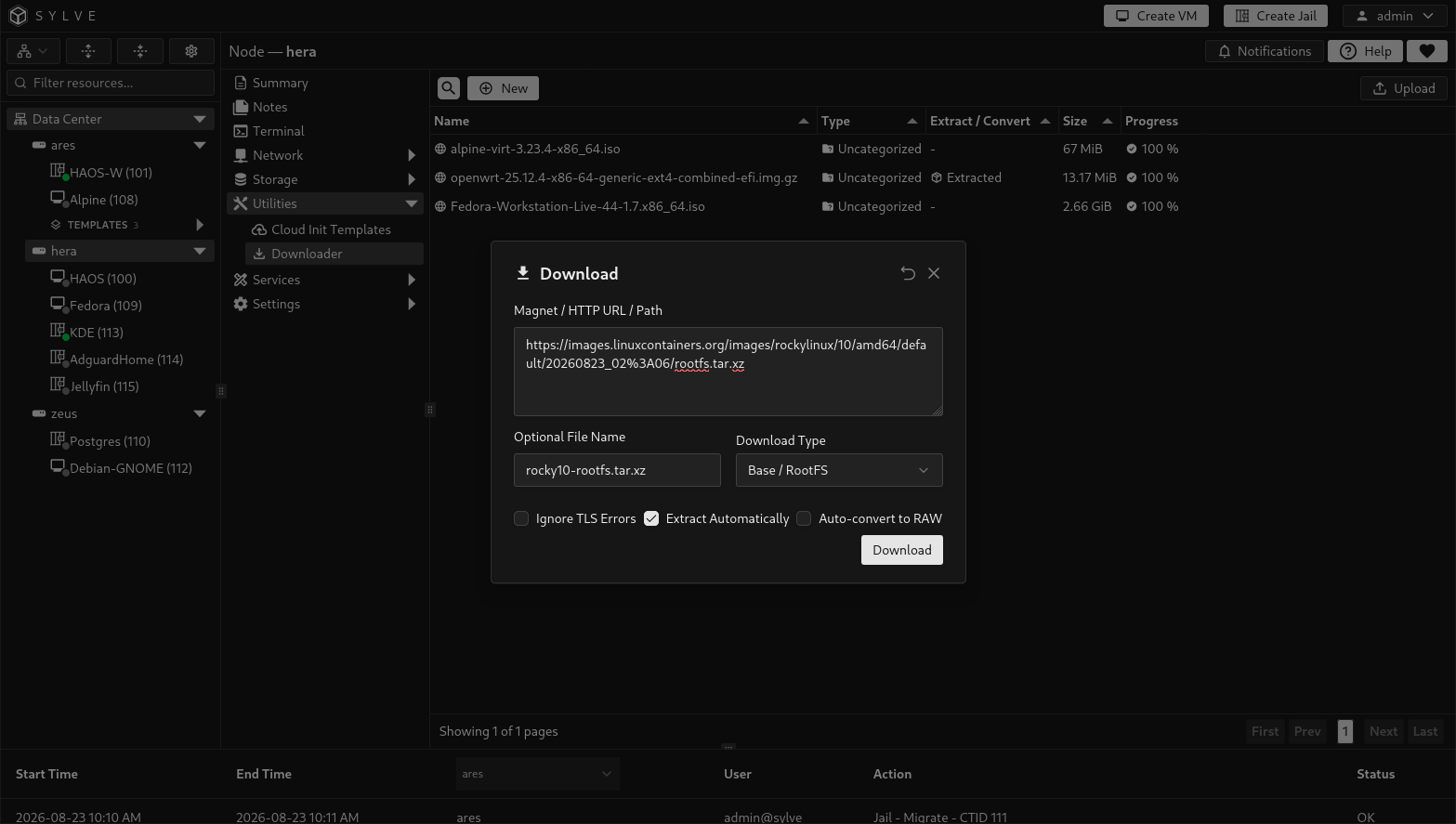
The screenshot was captured before changing Download Type. Select Base / RootFS instead of the displayed Uncategorized value before selecting Download. This classification makes the extracted directory available in the jail’s Base selector.
Select Download. The item moves from Pending to Processing while Sylve downloads and extracts the archive. Wait until its state is Done before creating the jail.
Extraction is required. Jail creation copies the contents of an extracted root filesystem directory and cannot use the compressed archive directly. For details about states, processing options, retries, and cleanup, see Downloader.
Create the Rocky Linux jail
Section titled “Create the Rocky Linux jail”Select Create Jail and use the Simple Jail values where this section does not specify a change.
Use these identity values:
- Jail Name:
RockyLinux - Hostname:
rockylinux - Description:
Rocky Linux 10 jail
Choose an unused Jail ID.
Storage
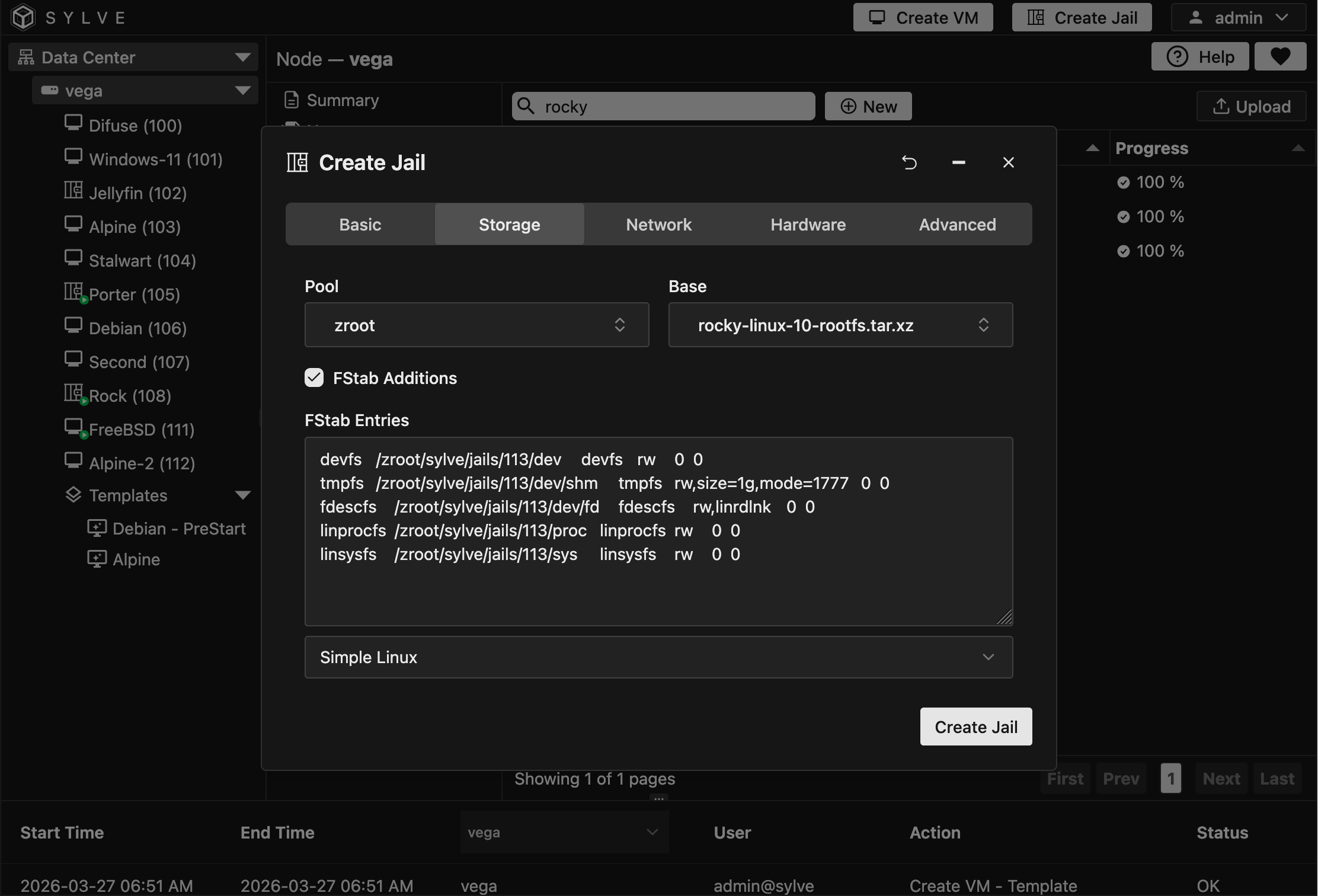
Section titled “Storage”Select the intended ZFS Pool, then choose rocky-linux-10.tar.xz under Base.
Enable FStab Additions and select Simple Linux. Sylve generates the devfs, tmpfs, fdescfs, linprocfs, and linsysfs mounts required by the Linux compatibility environment. Review the generated entries but do not replace them with the FreeBSD defaults.
Network
Section titled “Network”Select the Standard Switch prepared earlier. Linux jails cannot use DHCP or SLAAC in Sylve, so configure a static address:
- Select or enter an unused IPv4 Network address with its CIDR prefix.
- Select or enter the matching IPv4 Gateway.
- Optionally configure static IPv6 using IPv6 Network and IPv6 Gateway.
- Leave MAC Address empty to generate one, or select an unused managed MAC object.
- Keep VLAN at
0unless the upstream network requires a VLAN. - Enable Populate DNS Resolver Configuration and choose a suitable preset or provide your own resolver content.
The small create action beside an address, gateway, or MAC selector can create a Network Object without leaving the jail wizard.
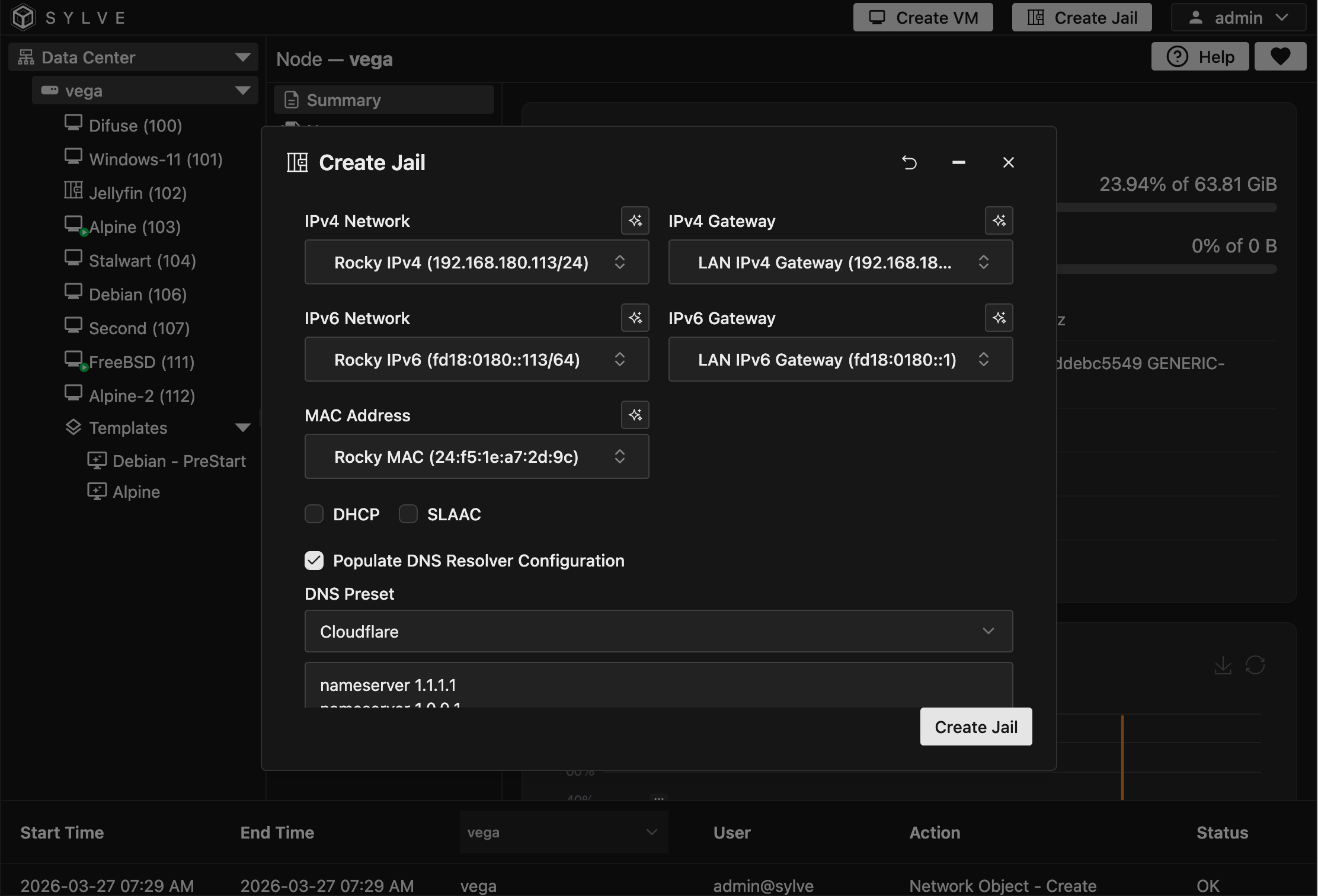
Use addresses appropriate for your network. Do not copy the example addresses from the screenshot unless they belong to your subnet and are unused.
Hardware
Section titled “Hardware”The Simple Jail starting point of one CPU core and 1 GiB of memory is sufficient for testing the base userland. Keep Boot Order set to 1, Start On Boot enabled, and Resource Limits enabled. Increase the limits later if the installed workload needs more capacity.
Advanced
Section titled “Advanced”Set Type to Linux. Changing the type applies Sylve’s Linux capability defaults and leaves the normal FreeBSD start and stop scripts disabled.
Keep Clean Environment enabled and leave the lifecycle hooks disabled unless the workload requires a deliberate custom startup command. Do not add /bin/sh /etc/rc, which is a FreeBSD service startup command and is not appropriate for this Rocky Linux root filesystem.
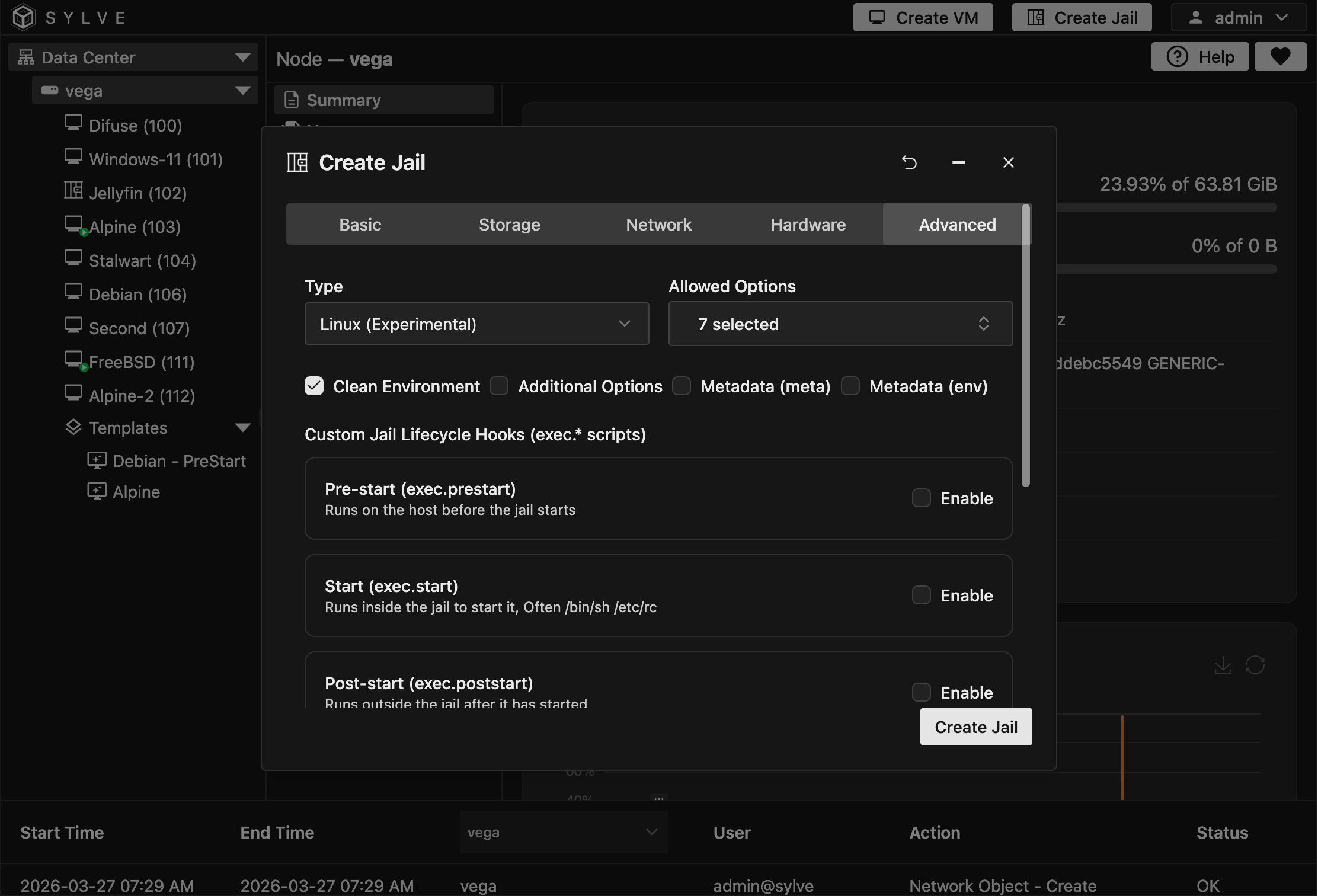
Review every tab and select Create Jail. Wait for creation to finish before opening the new jail.
Start and verify the jail
Section titled “Start and verify the jail”Open the Rocky Linux jail’s Summary page, select Start, and wait for the state to become Running. Then open Console.
Confirm the userland release:
cat /etc/rocky-releaseCheck the static network configuration injected by Sylve:
ip addressip routecat /etc/resolv.confVerify connectivity by refreshing the DNF metadata:
dnf makecacheThen install available Rocky Linux package updates:
dnf upgrade -y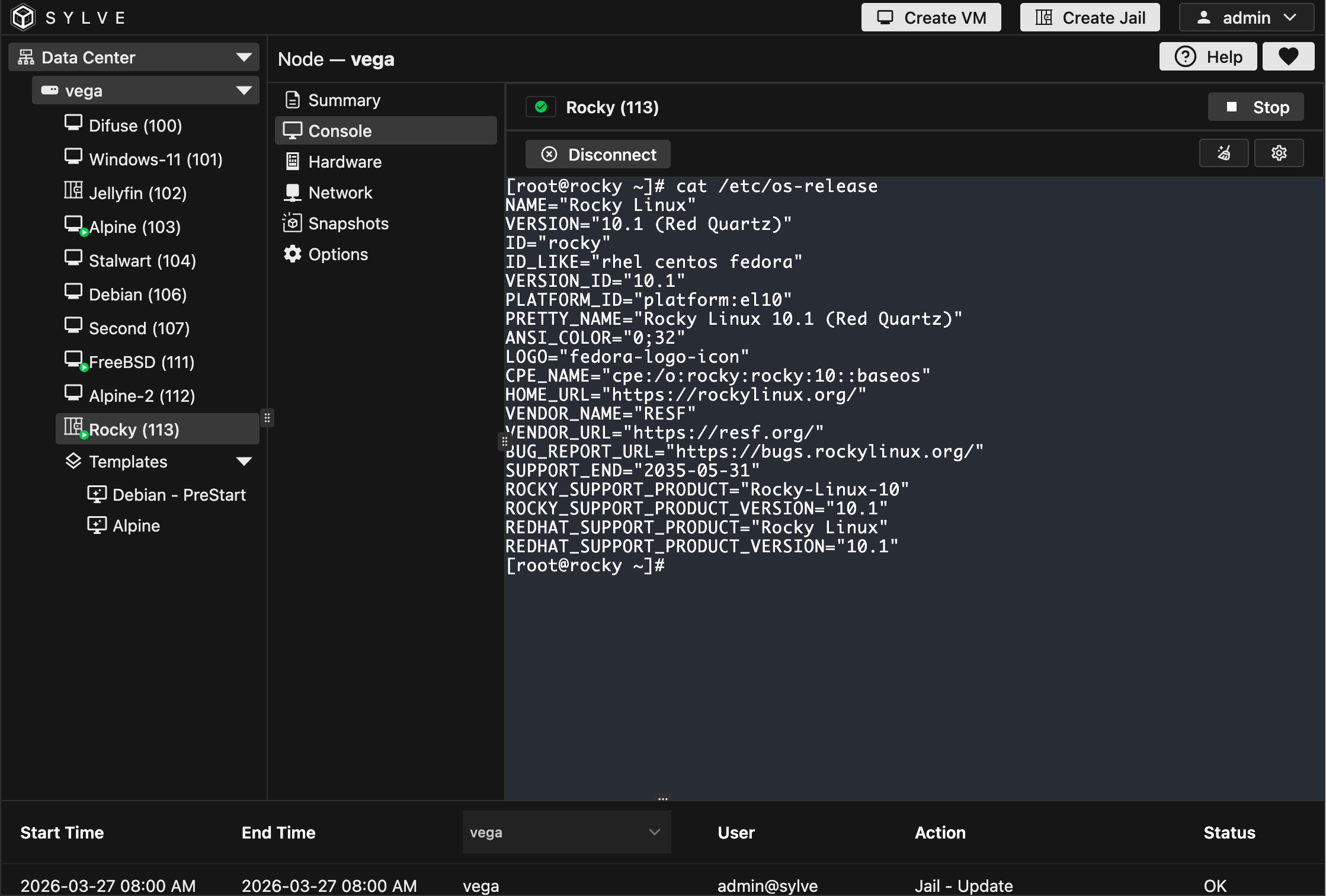
If dnf makecache cannot reach the repositories, inspect the address, default route, and /etc/resolv.conf separately. If the jail does not start, check its lifecycle logs and confirm that the Downloader item is fully extracted, Simple Linux fstab entries are present, and Linux is selected.
Understand the limitations
Section titled “Understand the limitations”Rocky Linux uses glibc, which is generally a better match for Linuxulator than a musl-based userland. Compatibility still depends on the application and the Linux system calls it uses.
Good candidates include command-line tools, build environments, and self-contained services that do not require a Linux kernel control plane. Prefer a VM for Docker or Podman engines, Kubernetes components, kernel modules, applications that require full systemd service management, or software that depends heavily on Linux namespaces and cgroups.
The Rocky Linux jail is now ready for application-specific configuration. Before major package or configuration changes, create a jail Snapshot or Backup.